
GitHub Desktop's short-lived tokens: what the rollout actually covers
Desktop 3.6.10 and later can use short-lived, refreshing tokens. The rollout is gradual, existing sessions stay signed in, and Enterprise Server is excluded.
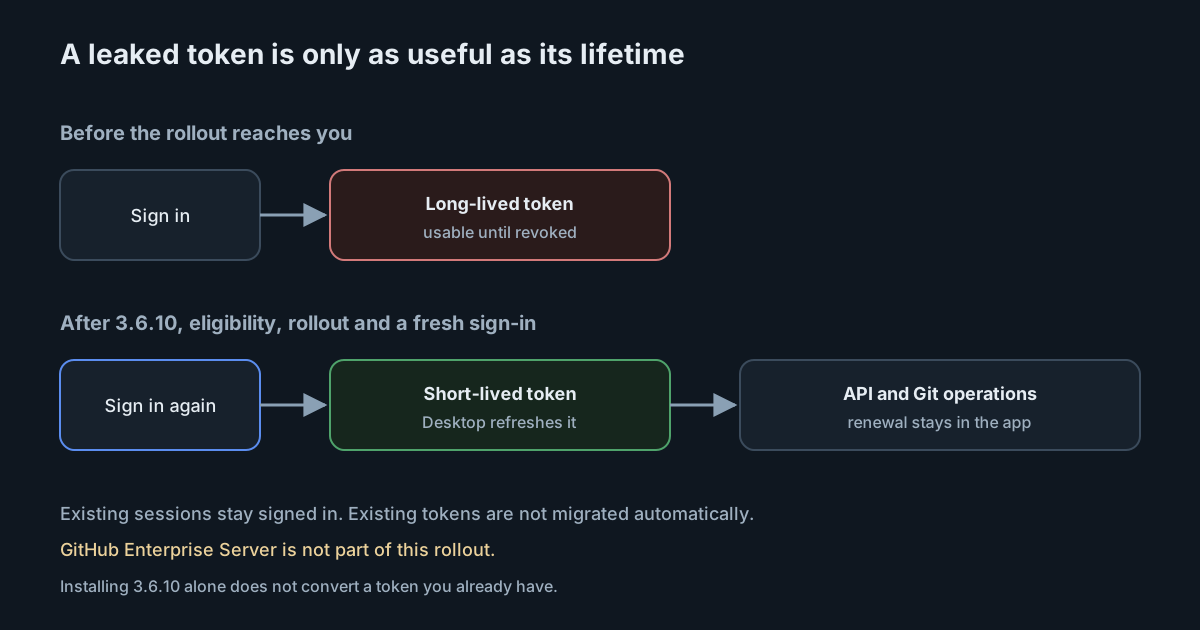
A leaked GitHub token found on a laptop is only as dangerous as the time it remains valid. On 2 November 2026 GitHub said GitHub Desktop can now use short-lived, automatically refreshing tokens for eligible accounts. That is the same direction the company already took with expiring tokens in GitHub CLI, and it matters more as coding agents and other local tools sit beside Desktop on the same machine. The details of the rollout are narrower than a headline about "Desktop now uses short-lived tokens" suggests, and the client release notes for 3.6.10 do not mention the change at all.
What the changelog says
The 2 November changelog is short and specific.
When you sign in to GitHub Desktop 3.6.10 or later, eligible accounts can use short-lived, automatically refreshing authentication tokens. Short-lived access tokens reduce how long a leaked token can be used. Desktop refreshes them automatically for GitHub API requests and Git operations, so renewal stays out of the everyday workflow.
The rollout is gradual on github.com, including GitHub Enterprise Cloud, and "isn't available to everyone yet." It does not include GitHub Enterprise Server. Existing sessions stay signed in after upgrading, and existing tokens are not automatically migrated. Short-lived tokens are issued during sign-in as the rollout reaches your installation.
That last paragraph is the operational core. Installing 3.6.10 does not, by itself, convert a signed-in user to a short-lived token. The user has to sign in again after the rollout has reached them. Until then, the older token remains whatever it was.
GitHub points readers at the latest Desktop build and at the authentication documentation for sign-in steps, and at the GitHub Desktop repository or GitHub Support for problems.
What the documentation says, and where it differs
The Desktop authentication docs now state the mechanism as current practice: "GitHub Desktop uses short-lived tokens when you authenticate to GitHub.com. This improves security by limiting how long a compromised token can be used." Sign-in is through the browser. Username and password inside Desktop are not supported on Windows; the docs require authenticating in the browser instead. Two-factor authentication, where it is configured, happens in that browser flow.
The docs and the changelog do not quite say the same thing about who already has this. The docs describe short-lived tokens as how Desktop authenticates to GitHub.com. The changelog, dated 2 November, says the server-side rollout is gradual, that not everyone has it yet, that GitHub Enterprise Server is excluded, and that existing tokens are not migrated. Read them together: the documentation describes the intended sign-in mechanism; the changelog describes a staged switch-over. If you are writing an internal standard that says "all Desktop users now have short-lived tokens," the changelog is the more precise source today.
The docs also walk through the failures that look like authentication problems and are often something else: a stored credential that no longer works ("Bad credentials"), a missing token in the system keychain ("empty token"), a repository the account cannot see, or a missing SSH key for git@ remotes. The first two are the ones a short-lived-token rollout is likely to surface. If Desktop cannot refresh a token, or cannot find the one it stored, the documented remedy is to sign out and sign back in.
One more source disagreement is worth stating plainly. The GitHub Desktop 3.6.10 client release, tagged on 30 October 2026, lists a Git for Windows update and does not mention authentication tokens. The changelog nevertheless names 3.6.10 or later as the client that can use the new tokens. The feature is therefore a combination of a minimum client version and a server-side issuance change, not a bullet in that client's release notes. Do not cite 3.6.10's own notes as evidence that the token change shipped in that build; cite the 2 November changelog.
Why this matters on machines that also run agents
Desktop is not an agent. It is still one of the most common ways a long-lived GitHub credential ends up in an operating-system keychain, next to editor plugins, CLIs and anything an agent might read. We wrote in October that infostealers now collect AI coding assistant credentials. A token that expires on its own does not stop that collection, but it shrinks the window in which a copy remains useful, which is the changelog's stated reason for the change.
The same logic applied when GitHub CLI moved to expiring OAuth tokens. In both cases the useful operational question is not "does the app support short-lived tokens?" but "has this installation actually been issued one?" For Desktop, the answer depends on four things the changelog names: the client is 3.6.10 or later, the account is eligible, the rollout has reached that installation, and the user has signed in since then.
GitHub Enterprise Server is excluded. Teams that mix github.com or Enterprise Cloud with a self-hosted GHES appliance should not expect the GHES sign-in to start issuing short-lived tokens as part of this change. The changelog is explicit on that point.
Enterprise automation that still uses classic personal access tokens is a separate problem, and a larger one. GitHub has been pushing GitHub Apps on the enterprise as the replacement for classic tokens in admin automation. Desktop's sign-in tokens and those classic PATs are different credentials with different lifetimes and different blast radii. Rotating one does not rotate the other.
What it means for engineering and security leaders
Treat this as a rollout to monitor, not as a control you can tick off after a silent auto-update. Ask a sample of Desktop users on github.com or Enterprise Cloud to check their version, sign out and sign back in once the changelog's rollout has reached you, and confirm they can fetch and push afterwards. Keep a note of anyone who still hits "Bad credentials" or an empty token: those are the documented symptoms of a stored credential Desktop can no longer use.
Do not announce to auditors that "GitHub Desktop uses short-lived tokens" as a fleet-wide fact until you know the rollout has reached your tenant and people have re-authenticated. The docs make that sentence true as a product description for GitHub.com sign-in; the changelog makes it incomplete as an inventory statement.
Pair the change with the rest of the credential work you should already be doing on developer laptops: fewer long-lived PATs, GitHub Apps for automation, and a plan for what happens when an infostealer dumps a keychain. A refreshing Desktop token is one smaller prize in that pile. It is not a substitute for keeping agent tools from reading credentials they do not need.
Practical takeaways
- Standardise on GitHub Desktop 3.6.10 or later. That is the minimum version the changelog names.
- Do not expect an upgrade alone to migrate existing sessions. Ask people to sign out and sign back in after the rollout reaches your installation.
- Record that GitHub Enterprise Server is out of scope for this change.
- If authentication fails after the switch, follow the documented first step: sign out and sign in again. Check the Desktop logs if that fails.
- Inventory other GitHub tokens on the same machines (CLI, classic PATs, GitHub Apps, editor plugins) separately. This rollout does not touch them.
- Use the 2 November changelog, not the 3.6.10 client notes, when you explain the change internally.