
Cursor Live Apps: publish checks teams should understand
Cursor's 5 November Live Apps release deploys shareable apps from cloud agents. What the publish checks cover, what admins control, and what remains on you.
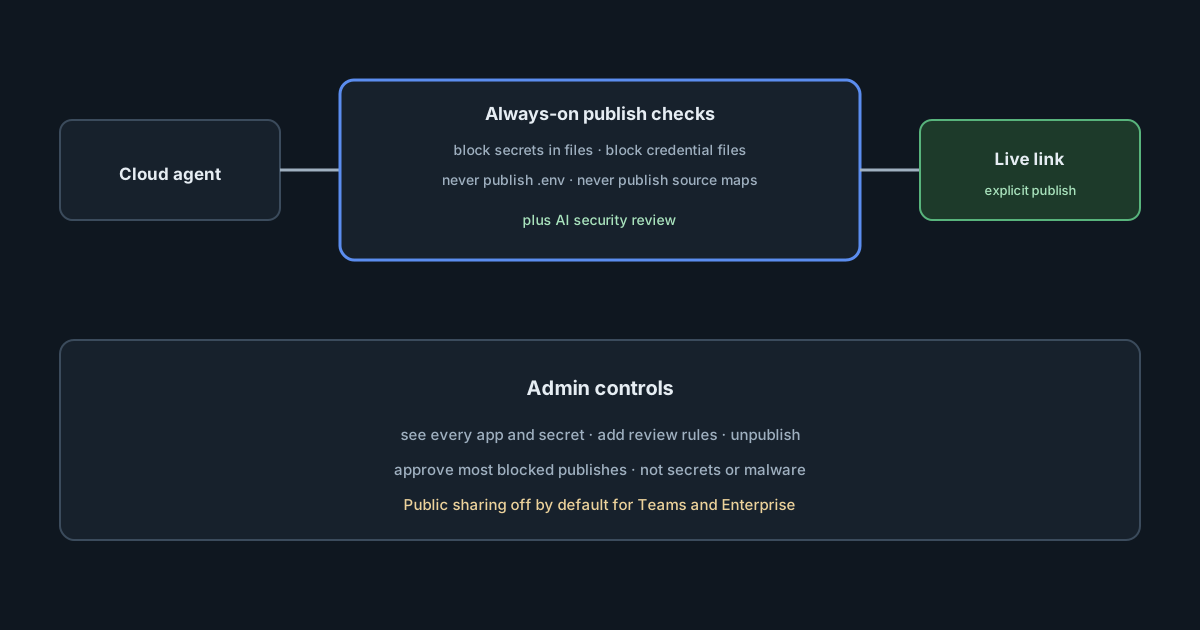
On 5 November 2026 Cursor shipped Build Live Apps: cloud agents that scaffold a web app, optionally provision a database, place authentication behind Cursor sign-in, and deploy a shareable link. The pitch is speed for internal tools. The governance question for engineering and security leaders is narrower: what blocks a publish, what a team admin can override, and what the feature still trusts the human (or the agent) to get right. Cursor's own Apps documentation is clearer than the changelog on the always-on checks; both are worth reading before the first finance dashboard goes live on a Cursor subdomain.
What shipped
From the changelog and docs:
- You start a cloud agent and say explicitly that you want to build an app (local agents are not supported for this path).
- Cursor scaffolds the app, can spin up a Postgres database, sets auth behind Cursor SSO for private and team apps, and provisions hosting in a dedicated account for the team (or individual).
- Publish is explicit: you pick a URL, Cursor runs security checks, and nothing goes live until checks pass and you publish.
- Sharing can be specific people, groups, the whole team, or—on individual plans—public. For Teams and Enterprise, public sharing is disabled by default; an admin can enable it.
- Availability: all paid plans with cloud agents enabled.
Git providers: new or existing repos on Cursor Origin and GitHub. The changelog says GitLab support is coming soon, so GitLab deploys aren't available yet.
The publish checks that are always on
The docs list four checks that run before every publish, even when the broader AI security review is turned off:
- Block secrets written in app files — stops the publish if a file contains an API key or access token.
- Block credential files — stops private keys, service-account keys or files with auth tokens.
- Never publish
.envfiles — leaves.envout of what ships. - Never publish source maps — removes source maps so visitors cannot read original source as easily.
On top of those, an AI security review reads the app's files and can block serious issues. Team admins can add their own instructions to that review prompt; custom instructions can add rules but cannot remove Cursor's built-in checks.
Team admins can approve publishes the review blocked, except for malicious code, hardcoded secrets or exposed credentials. They can also see every app and secret on the team, unpublish any app, turn Apps on or off, allow or disallow public apps and API keys, with changes recorded in the team's audit log.
Secrets the app needs for warehouses or other systems are prompted for; the docs say the agent never sees the values, and in most cases a team admin creates team secrets in the Apps dashboard.
What the checks do not replace
Deterministic secret scanning at publish time is necessary and still incomplete. It will not understand your organisation's data classification, whether a dashboard should be team-wide or finance-only, or whether the agent's schema exposes personal data. The AI review is another model pass over the files; treat it as an assistant to human review, not as a sign-off.
Hosting isolation (a dedicated account per team) reduces noisy-neighbour risk between customers. It does not decide who inside your company should see revenue figures. Sharing defaults help—public off for Teams and Enterprise—but an admin who enables public apps or over-shares a team app undoes that default.
API keys for scripts and automation (x-cursor-app-token) bypass interactive sign-in by design. The docs mark those requests as automated and identify the key, never a person. Inventory those keys the way you inventory other machine identities.
Cursor's docs also include a liability and acceptable-use notice: publication is not endorsement, hosting is separate from Cursor's core services, and apps may be removed for policy or legal reasons. That is vendor language, not a control you can configure away.
What it means for engineering and security leaders
Decide whether Live Apps is an approved path before it spreads. Internal tools that used to need a ticket to platform engineering can now ship from a chat thread. Without a policy, you will discover apps in the admin list after they hold real data.
Map admin powers deliberately. Who may approve a blocked publish, enable public apps, create team secrets or issue API keys should be a named role, not "whoever found the Apps dashboard".
Keep human review for data-sensitive apps. Pair Cursor's checks with your usual privacy and security review when an app touches customer data, payments or HR.
Track git provider scope. Today the documented repo sources are Cursor Origin and GitHub. Teams standardised on other hosts need an explicit interim process.
Practical takeaways
- Read the Apps docs end to end before enabling the feature organisation-wide; the changelog alone omits several control details.
- Leave public sharing off unless there is a written exception process.
- Assign Apps admins and review the app and secret inventory on a schedule.
- Treat publish failures as signals to fix, not as prompts to seek override, especially for secrets.
- Inventory
x-cursor-app-tokenkeys and restrict which apps each key can open. - Require an explicit cloud-agent prompt ("build an app") only in approved projects, so casual sessions do not create hosted surface area by accident.
- Document what "coming soon" means for GitLab internally so nobody assumes it works today.