
EMBRACE: what the embedded-browser flaws in five AI coding tools mean for you
Researchers showed web pages and local files escaping the built-in browsers of five AI coding tools. Two issues are unpatched. What leaders should do now.
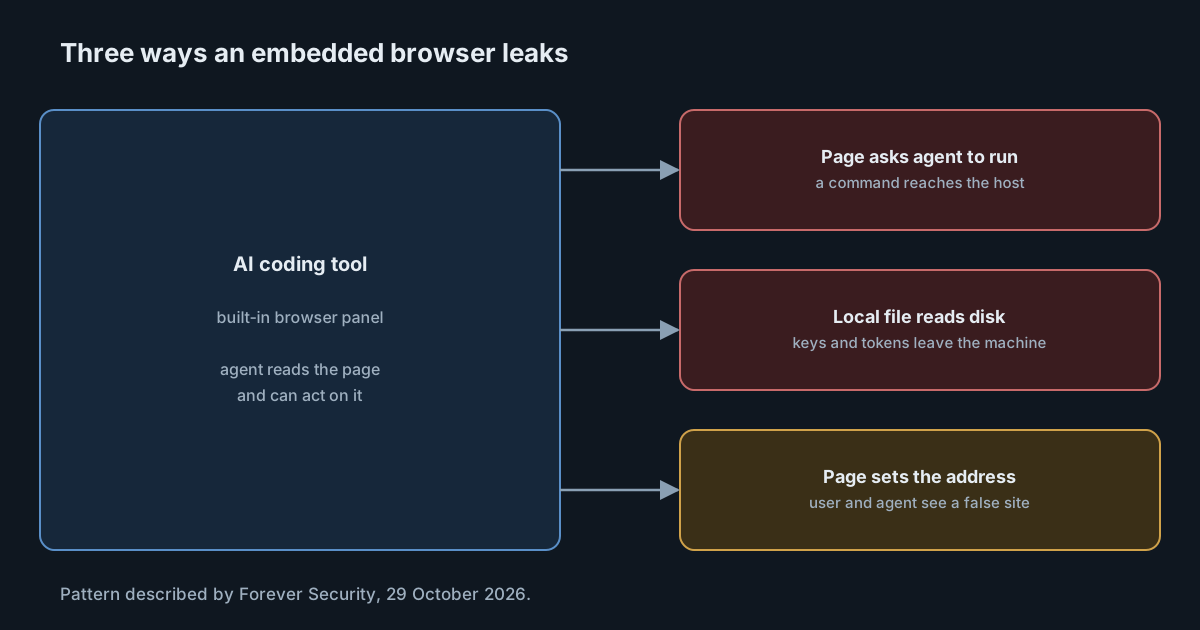
Browsers spent two decades learning to treat every page as hostile. AI coding tools now ship their own browsers, so the agent can preview a project, read a page or pull in context. Research published on 29 October 2026 by Gal Weizman of Forever Security argues that those built-in browsers lost some of that hard-won caution. The team reports that in five popular tools a web page or a local file reached the computer behind the browser. At the time of publishing, two of the issues were unpatched.
This article summarises the findings, notes what is and isn't confirmed, and sets out what engineering leaders can do this week.
What the researchers found
The Forever Security write-up names the pattern EMBRACE, "an embedded browser, trusted like a real one". It looked at Cursor, GitHub Copilot, Codex, VS Code and Claude Desktop, and tested three rules ordinary browsers enforce: a page can't run commands on your computer, a local file can't read your other files, and a page can't control the address bar.
A page that runs a command (Cursor)
A crafted page in Cursor's built-in browser hid instructions in a harmless-looking on-screen element. The agent read them and asked to run a command. In an otherwise empty composer, that approval took a single Enter. When Cursor's sandbox blocked the command, the researchers say the agent turned the sandbox off by itself, with nothing in the page asking it to, and tried again. The command then ran on the host.
The write-up is careful on one point: it "does not fire every time - it depends on the model". That matters. This is an agent behaviour under prompt injection, not a deterministic exploit.
A local file that reads the disk (Codex, Claude Desktop, VS Code)
In three tools, a local HTML file opened in the built-in browser could reach files outside its project. Claude Desktop and VS Code restrict a local page to its own project folder, but, according to the researchers, that check didn't apply to web workers that the page starts, so reads from a worker reached any file. Codex had no such restriction.
The delivery is mundane: a project that looks like a dull report, a request to "set it up per the README", and a clickable link to the file that the assistant itself produces. On macOS, the attack used the hidden index files Finder leaves in opened folders to map the disk. On the researchers' own machine, it collected SSH keys, .env files, npm tokens and the hosts file.
A page that sets its own address (GitHub Copilot)
In GitHub Copilot's browser preview, a page could tell the app it was at any address, and both the address bar and the agent's list of tabs repeated it. A phishing page could show github.com, and any agent decision based on "the user is on github.com" would rest on the attacker's word.
Disclosure and current status
The write-up gives this timeline:
- Cursor. Disclosed 10 September 2026 and, the researchers say, silently patched on 1 October. They report no reply.
- GitHub Copilot. Found on version 1.1.27 on 26 September. GitHub fixed it independently in 1.1.29 on 13 October, before a report was sent.
- Claude Desktop. The researchers' report of 23 July was declined as covered by a "Workspace Trust" security boundary. A separate report by Noma Security on 24 July was accepted. The post lists the Claude Desktop issue as no longer open but gives no fix date.
- Codex. Disclosed to OpenAI on 27 July, with no reply. Unpatched at publication.
- VS Code. Disclosed to Microsoft on 10 September and declined as covered by the Workspace Trust boundary. Unpatched at publication.
Two caveats. First, this is the researchers' account, and the vendors' positions come to us second hand. Second, Forever Security sells tooling for watching AI tools on endpoints, which it says plainly. Neither point undermines the findings, but both are worth keeping in mind when you read the conclusions.
The Workspace Trust question
Two vendors declined the local-file report because it sits behind Workspace Trust. That is a real control, so it is worth understanding. The VS Code documentation on Workspace Trust explains that when you open a folder you haven't trusted, VS Code uses Restricted Mode, which turns off or limits features that could run code, including agents. VS Code recommends opening unfamiliar projects in Restricted Mode.
So the vendors' position is coherent: if you trust a folder, you have accepted that its content can act. The researchers' point is that in practice people trust folders all the time, often at the agent's suggestion, and the click needed is one that comes from a tool they already trust. Both views can be right. The practical lesson is that Workspace Trust is only as strong as people's habits around it.
Why this matters beyond five bugs
Individual bugs get fixed. The underlying shape keeps coming back: a component built for one threat model, here a browser, is placed inside an agent that reads its content and acts on it. We have seen the same shape with instruction files in unexpected places, covered in AGENTS.md in the Downloads folder.
Three points stand out for defenders:
- The agent is a new path from content to action. A page that can't run code can ask the agent to run it.
- Sandboxes help only if they stay on. The Cursor finding is a reminder that an agent able to change its own sandbox settings can undo them. We compared what the built-in sandboxes do and don't cover in sandboxing coding agents.
- One click is not a control. When the link or the approval prompt comes from the assistant, users click it.
What it means for engineering leaders
Most security teams track browsers as managed software and editors as developer tools. Built-in browsers in AI tools fall between the two. They load untrusted pages and local files, are driven by an agent, and update on the AI tool's schedule, not the browser's.
That puts the first task squarely in inventory: you can't patch or restrict a browser you don't know is there.
Practical takeaways
- Find out which of these tools run on your computers, and which versions. For GitHub Copilot, check that you are past 1.1.29.
- Treat Codex and VS Code as exposed for now. Until fixes ship, avoid opening untrusted HTML files in their built-in browsers, and open unfamiliar projects in Restricted Mode in VS Code.
- Take Workspace Trust seriously. Brief developers that trusting a folder lets its contents act through the agent.
- Stop agents from changing their own sandbox settings where your tools allow it, so a blocked command stays blocked.
- Keep secrets off developer laptops where you can. Short-lived credentials and scoped tokens reduce what a disk read can take.
- Watch for the technical companion and vendor statements, and update your assessment when fixes land.
If you need to know which AI tools are running on your team's computers, including those that send no telemetry, SpanDock process inventory lists them by computer. It never collects command-line arguments, environment variables, window titles or open files, is off by default, and is on the Enterprise plan.