
The AWS API MCP Server accepted tokens meant for other apps: what to check
Versions 1.3.0 to 1.5.x of the AWS API MCP Server skipped the token audience check in HTTP mode. What was affected, the fix in 1.6.0 and what to set.
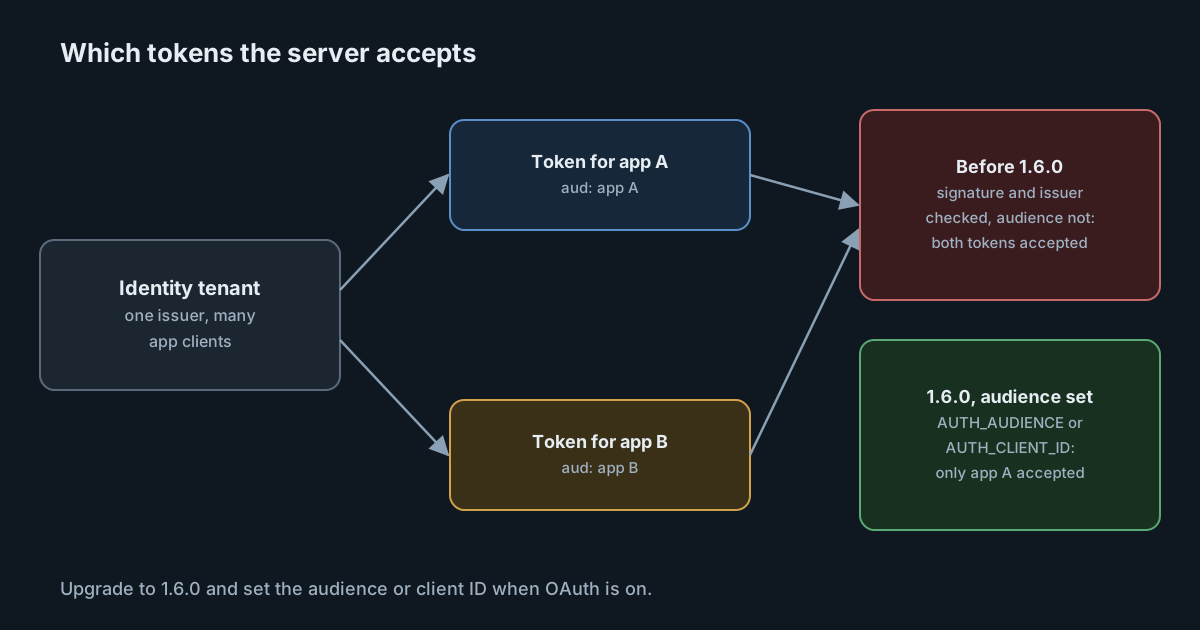
On 27 October 2026 AWS published security bulletin 2026-152-AWS for the AWS API MCP Server, the open-source MCP server that lets an AI agent run AWS CLI commands. When it ran over HTTP with OAuth, versions 1.3.0 up to, but not including, 1.6.0 checked that a token was genuine but not who it was issued for. A token issued to a different application in the same identity tenant was accepted, and the server then made AWS API calls with its own credentials. The fix is in 1.6.0, and like several MCP fixes this autumn, it only protects you once you configure it.
What the bulletin and advisory say
The GitHub advisory GHSA-4prq-p2x5-w9fh, assigned CVE-2026-115413, gives the detail. In the affected versions, the server's OAuth support validated a JSON Web Token's signature, issuer and expiry, but not its audience or client claim. The example the advisory uses is concrete: a token issued to a second Amazon Cognito app client in the same user pool would be accepted, although it was never meant for the MCP server.
The bulletin is careful about who could exploit this. It describes "a local caller holding such a token", and the advisory's CVSS v4 vector (7.3, rated High by GitHub) scores the attack as local, with low privileges and an extra precondition. That fits the design: the server's HTTP mode listens on 127.0.0.1, port 8000, by default. AWS labels the bulletin "Important (requires attention)". Read together, the two sources describe a real gap, not an internet-wide emergency.
The scope is narrow in another way too. Only the streamable HTTP transport with OAuth enabled is affected. The default transport, stdio, takes no tokens at all, and switching back to it is the workaround the bulletin gives for anyone who can't upgrade yet.
Why the audience matters so much here
A token's audience, usually the aud claim, names the service it was issued for. Most organisations run one identity provider that issues tokens to many applications. If a server accepts any valid token from that provider, every application's token becomes a key to that server.
For most services the damage would be limited to that service's data. For this one it is not. The AWS API MCP Server turns tool calls into AWS API calls signed with whatever credentials the host has. A token that leaked from, say, an internal dashboard, or that a colleague obtained for an unrelated tool, could be replayed against the MCP server to act in an AWS account with the server's permissions. The project's README says IAM permissions remain the primary security control, and that is the right way to read the risk: the bug removes the check on who may ask, and IAM decides what the answer can do.
The MCP authorization specification has required this check all along: MCP servers "MUST validate that access tokens were issued specifically for them as the intended audience", following RFC 8707. We covered the same gap in the official SDKs in MCP SDKs can now check a token's audience. The AWS server is a reminder that the gap was not confined to the SDKs: any MCP server that writes its own token verification can make the same omission.
The fix, and the setting it needs
Version 1.6.0 was uploaded to PyPI on 27 October. It adds two settings, and the project's README says at least one of them is required when OAuth is on. Both can be set, and then both claims are checked:
| Setting | Use it when |
|---|---|
AUTH_AUDIENCE | Your identity provider puts the server's identifier in the token's aud claim |
AUTH_CLIENT_ID | It doesn't, as with Amazon Cognito access tokens, which name the app in client_id (or azp) and carry no aud claim |
The second row is the detail most likely to trip teams up. A team on Cognito that reads "audience" and looks for an aud claim won't find one. Checking the client claim is the Cognito equivalent, and the README names Cognito as the case it is for.
One source disagreement is worth noting. At the time of writing, the repository's changelog still lists AUTH_AUDIENCE and AUTH_CLIENT_ID under "Unreleased", although 1.6.0 is on PyPI and the advisory names it as the fixed version. Treat the advisory and the published package as authoritative, and confirm the version you install with your package manager rather than the changelog.
The README's warning about HTTP mode
The README says HTTP mode is "intended for single customer use only" and is "NOT designed for multi-tenant environments or serving multiple users simultaneously". Elsewhere it says each instance should serve one user with their own dedicated AWS credentials. That matters as much as the bug itself. Any team that put one HTTP instance in front of several people or groups was relying on token validation to separate them, against the project's own guidance, and that separation was what failed.
The server has two other controls worth turning on regardless of version: READ_OPERATIONS_ONLY, which limits it to read operations, and REQUIRE_MUTATION_CONSENT, which asks for explicit consent, through MCP elicitation, before any operation that isn't read-only. The consent prompt needs a client that supports elicitation.
What it means for engineering and security leaders
- Know which MCP servers hold cloud credentials. A server that signs calls with host credentials deserves the same review as any other service with those credentials, including who can reach its port.
- Ask whether each HTTP MCP server checks the audience. It is the same question for vendor servers, open-source servers and your own. The answer has to be a configuration you can point to, not an assumption.
- Prefer stdio for single-user use. If one developer runs the server on their own computer for their own agent, the HTTP transport adds attack surface without adding much.
Practical takeaways
- Find every installation of
awslabs.aws-api-mcp-server, and note which ones use the streamable HTTP transport with OAuth. - Upgrade those to 1.6.0 or later, and set
AUTH_AUDIENCE, orAUTH_CLIENT_IDfor Cognito. - Test with two tokens before you deploy: one for the MCP server's own app client (accepted) and one for another app client in the same tenant (refused).
- If you can't upgrade this week, switch to the stdio transport.
- Review the IAM role the server uses: scope it to what agents actually need, and turn on
READ_OPERATIONS_ONLYwhere writes aren't needed.
If your AI tools reach your organisation's connectors through the SpanDock MCP gateway (Premium and Enterprise plans), connector tokens and sign-ins are kept in the server's credential store and never sent to computers, every connector starts read-only for everyone, and destructive tools still need approval when write access is granted. MCP servers you host yourself behind it still need their own token checks.