
Claude Code settings from the Enterprise Admin Console: what sign-in leaves out
Claude Code 2.1.330 can take an organisation's settings at sign-in instead of a managed file. What moves, what doesn't, and the gaps to close before you switch.
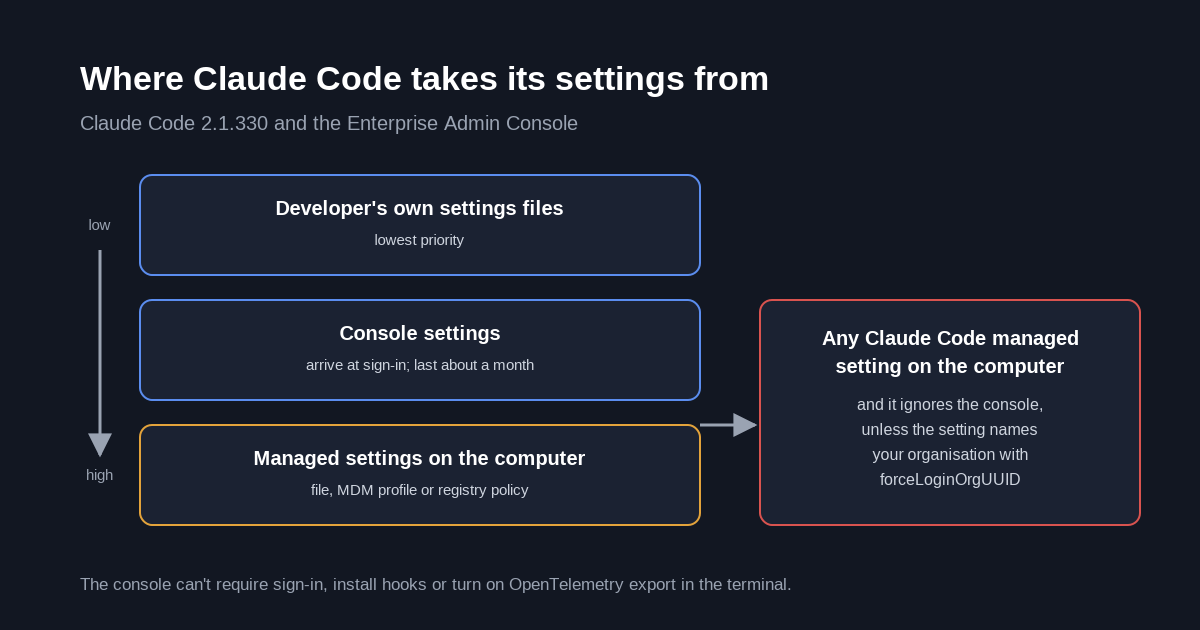
Claude Code 2.1.330, released on 20 November 2026, can sign in to an organisation managed in Anthropic's Enterprise Admin Console and apply that organisation's settings and provider or gateway. For administrators, that is an alternative to shipping a managed-settings.json file to every laptop. It is a real convenience, but the settings now depend on a sign-in that each developer chooses to make, that lasts about a month, and that cannot carry everything a file could. Read the limits before you remove the files.
What changed
The changelog entry for 2.1.330 puts it in one line: after claude auth login, Claude Code "applies the organization's settings and uses its cloud provider or gateway". Anthropic's administrator guide fills in the model. The console already configures Claude Desktop for organisations that use their own cloud provider or gateway. Claude Code in the terminal and in VS Code now follows the same pages: model requests go to the connection on the console's Connection page, and console settings apply as managed settings that the developer's own files can't override.
Restrictions with no console field go on a separate page, Organization settings → Products → Claude Code, as JSON in the managed-settings.json format. The guide gives deny rules, blocked models and turning off workflows as examples. That JSON accepts only a fixed list of settings, Claude Code ignores the rest, and the console doesn't check it when you save. According to the guide, nothing in it can grant a permission, run a command, sign in, or choose a provider or model.
Both Claude Code and the VS Code extension must be on 2.1.330 or later. The guide warns that earlier versions either ignore the console or drop more of the computer's settings after a sign-in.
Which settings win
Claude Code now takes settings from three places. From lowest to highest priority:
- the developer's own settings files;
- console settings, which arrive when the developer signs in to the organisation;
- managed settings on the computer: a
managed-settings.jsonfile, a macOS MDM profile or a Windows registry policy (not a per-user HKCU policy).
The surprising part is the third level. A computer with any Claude Code managed setting, the guide says, "ignores your console completely", and even a single proxy variable counts. To use the console on such a computer, you either remove every managed setting, or keep them and name your organisation in them with forceLoginOrgUUID. That second route also makes the computer refuse sign-ins to other organisations.
What the console can't do
The guide lists settings that need to stay on the computer, or that developers now set themselves. Four matter most for governance:
- Requiring the sign-in. Signing in is "each developer's choice". Without a managed file, a developer can sign in to another organisation or not sign in at all, and then your settings aren't applied.
- OpenTelemetry export. The console can't turn on
CLAUDE_CODE_ENABLE_TELEMETRYor theOTEL_variables in the terminal. The guide is blunt: if you remove them with the file, "your collector stops getting data from Claude Code". The console's own OpenTelemetry fields export from Claude Desktop only. - Hooks, and plugins and MCP servers you install for people. The console can't install them in the terminal.
- Allow rules, the default permission mode and added directories. The developer's own settings decide these, even if you keep managed settings.
requiredMinimumVersion, allowedProviders and the managed CLAUDE.md text also have no place in the console.
Sign-ins expire, and offboarding has three steps
A sign-in lasts about a month. When it ends, Claude Code may stop with "no usable organization sign-in", but if the developer then starts it with their own Claude login or API key, requests go to the Anthropic API without your settings. Removing a leaver is three steps, in order: revoke their access to your provider or gateway (removing them from the organisation doesn't), ask them to run claude auth logout, then remove them from the organisation. An open session can keep using your connection until the developer exits it.
On the positive side, Claude Code downloads the settings each time it starts, an open session checks hourly, and while a developer is signed in Claude Code won't start if it can't reach Anthropic to fetch them.
One MCP change in the same release
2.1.330 also narrowed how a serverName entry in deniedMcpServers treats claude.ai connectors. It now hides "only the named claude.ai connector, not others at its URL"; to block them all, the changelog says, deny the exact URL. The managed MCP documentation already warns that a serverName entry "is not a security control", because a name is a label anyone can assign and a connector's display name can change. If your deny list relies on names, this release is a good reason to move to serverUrl entries.
What it means for engineering and security leaders
Moving settings from files to sign-in trades enforcement for convenience. A file applies to every session on the computer; a sign-in applies only while it is valid and only if the developer made it. For organisations whose controls fit on the console's pages, such as a model list, allowed egress hosts or deny rules, that can be a fair trade. For organisations that depend on hooks, telemetry or a minimum version, it isn't, and the guide's own answer is to keep a small managed file beside the console with forceLoginOrgUUID.
The telemetry gap deserves attention because it fails silently. Nothing breaks for the developer when OpenTelemetry export stops; a dashboard just gets quieter. Plan the change with the people who own your observability, not only the people who own the laptops.
Where SpanDock fits
If you move Claude Code to console sign-in, it helps to see which AI tools are running even when one stops sending telemetry. SpanDock's process inventory has each computer report the AI tools it runs, by program name and path, every few minutes, including tools that send no telemetry; it never collects command-line arguments or environment variables. Process inventory is on the Enterprise plan.
Practical takeaways
- Audit for stray managed settings before a pilot: one proxy variable makes a computer ignore the console.
- Keep a small managed file with
forceLoginOrgUUIDif you need hooks, telemetry, a minimum version or a required sign-in. - Check OpenTelemetry after the pilot: confirm your collector still receives Claude Code data from pilot machines.
- Update your leaver checklist: provider or gateway access first, then
claude auth logout, then organisation removal. - Replace
serverNamedeny entries withserverUrlentries for connectors you mean to block. - Get everyone to 2.1.330 or later, CLI and VS Code extension, before turning sign-in on; the console itself can't require a minimum version.