
OpenAI's two-hour and eight-hour windows: discounted agent runs, and what they cost you
OpenAI now cuts token rates 30% or 40% for background requests that can wait 2 or 8 hours. How that compares with Batch and Flex, and the trade-offs.
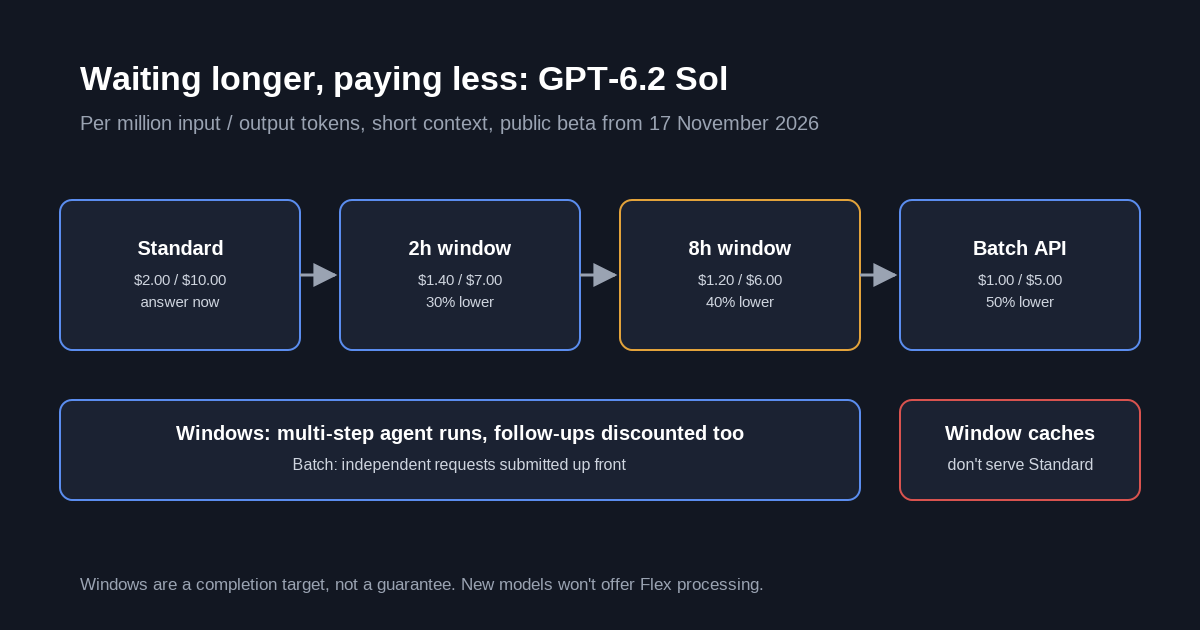
On 17 November 2026 OpenAI added a new way to pay less for work that doesn't need an answer straight away. In the Responses API, a background request can now choose a two-hour or eight-hour completion window, and model token rates drop by 30% or 40% respectively. Unlike the Batch API, the windows work for multi-step agent runs, where each answer decides the next request. For teams running overnight reviews, evaluations or report generation with agents, that is a real saving. It comes with conditions on caching, rate limits and data that are easy to miss.
What OpenAI released
The changelog entry describes it as a public beta on four models: GPT-6.2 Astra, GPT-6.2 Sol, GPT-6.1 Terra and GPT-6 Luna. The background mode guide sets out three windows:
| Window | Discount on model token rates |
|---|---|
soonest (the default) | none |
2h | 30% below Standard |
8h | 40% below Standard |
For 2h and 8h, the guide says the API "targets completion within the selected window after it accepts the request". That is a target, not a guarantee, and the clock starts at acceptance, not when you send. After accepting a request, the API retries eligible capacity errors by itself.
To qualify, a request must set background to true, use Standard processing (service_tier of default; with auto it qualifies only if the API happens to pick Standard), and not stream. Results arrive by webhook, or by polling the response ID.
The same changelog entry has a second line that matters as much: new models "will not support Flex processing". Flex stays on the models that have it while that beta winds down. For new models, the windows are OpenAI's replacement for the cheap-but-slow tier.
How the price compares
The pricing page lists GPT-6.2 Sol at $2.00 per million input tokens and $10.00 per million output tokens on Standard, for short context. Applying the published discounts:
| GPT-6.2 Sol, per million tokens | Input | Output |
|---|---|---|
| Standard | $2.00 | $10.00 |
2h window, 30% lower | $1.40 | $7.00 |
8h window, 40% lower | $1.20 | $6.00 |
| Batch API, as listed | $1.00 | $5.00 |
Batch remains cheaper, at half price. The difference is what each one can do. The guide points to Batch for "independent requests you can submit together up front", and to background windows for agent runs, where your application reads a response, runs a tool, and sends a follow-up. The discount applies to each eligible request in the run, including follow-ups. Reusing a continuation_id you choose, along with the same window, model and project, makes follow-ups eligible for higher queue priority. Start times still depend on scheduling, so an eight-hour run with many steps could take longer than eight hours end to end; the guide doesn't promise a total time.
The conditions worth reading twice
Prompt caching doesn't cross over
The guide says Standard requests outside the discounted windows "can't reuse prompt cache entries" created by 2h or 8h requests, "even when the prompt is identical". If your interactive traffic and your overnight jobs share a long system prompt, moving the overnight jobs into a window can lower their token price but stop them warming the cache for daytime use. Measure the effect on cached input before and after.
They share Batch's rate limit
Window requests share the Batch/Background rate limit with Batch API jobs, and input tokens count at submission. A large overnight agent job and a large Batch job in the same organisation can now compete for the same allowance.
Data is stored while the request runs
Background mode, the guide says, "temporarily stores response data even when you set store to false or use Zero Data Retention", encrypted at rest for all windows. OpenAI's data controls page adds that projects with Zero Data Retention can use the 2h and 8h windows, with store treated as false and application state stored temporarily. It gives a figure of roughly 10 minutes for the default window but no figure for the longer ones. For a two-hour or eight-hour wait, the reasonable assumption is that data is held at least until the response is available for retrieval. If your data protection assessment relied on "nothing is stored", update it before moving sensitive work into a window.
What it means for engineering and security leaders
Most organisations have a pile of agent work that nobody watches in real time: nightly code review of the day's pull requests, documentation audits, evaluation runs, dependency triage. Until now the cheap options for that work were either Batch, which doesn't suit multi-step agents, or Flex, which new models won't offer. The windows fill that gap at a predictable discount.
The decision is less about price than about plumbing. Teams need webhook handling, a way to replay conversation history if a prior response expires, and monitoring for runs that overshoot their window. They also need a clear rule about which data may sit in a provider's temporary storage for hours. Those are platform questions, so it is worth deciding them once, centrally, rather than in each team's scripts.
Practical takeaways
- List the agent jobs that can wait two or eight hours: nightly reviews, evaluations and reports are the obvious candidates.
- Use Batch for independent requests and the windows for multi-step runs; Batch is still the cheaper of the two.
- Set
service_tiertodefaultexplicitly;autoonly qualifies when it selects Standard. - Check your cache hit rate after moving work into a window, since window caches don't serve Standard requests.
- Watch the shared Batch/Background rate limit if you also run large Batch jobs.
- Review data handling: background requests store data temporarily even under Zero Data Retention.
- Plan for Flex's end on new models, and move cost-sensitive work to Batch or the windows.