
Copilot server-to-server auth: an app that spends your organisation's budget
GitHub Copilot now accepts GitHub App installation tokens, billed to the organisation. How it works, what it costs to control, and where attribution lives.
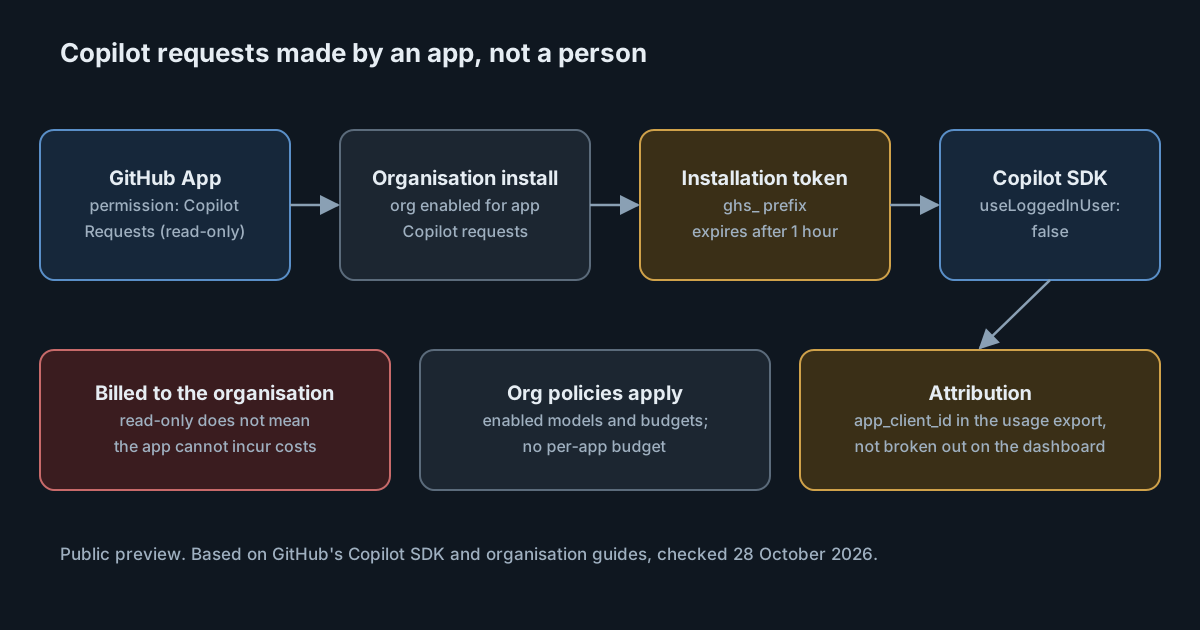
Most Copilot usage has a person behind it: a signed-in user, a personal token, a seat. On 27 October 2026 GitHub announced server-to-server authentication for Copilot, in public preview. A GitHub App installed on an organisation can now call Copilot with its own installation token, and the usage is billed to that organisation. It is a sensible fix for automation that had been borrowing someone's identity. It also creates a new kind of spender that doesn't hold a seat, doesn't sign in, and can't be given a budget of its own.
How it works
The Copilot SDK guide sets out the steps:
- Create a GitHub App and give it the organisation permission Copilot Requests at Read-only. In token terms this is
organization_copilot_requests: read. - Install the app on an organisation. Only organisation installations work: installations on a personal account or an enterprise can't make Copilot requests this way.
- Mint an installation token (it starts with
ghs_) and pass it to the SDK asgitHubToken(orgithub_tokenin Python), withuseLoggedInUserset tofalse. That setting also stops the SDK from picking up a token from environment variables such asCOPILOT_GITHUB_TOKEN, so the app's identity is the only one in play. - Installation tokens expire after one hour. The guide's advice is to mint a new one and restart the client before that happens.
The organisation has to allow it. Per GitHub's organisation guide, the organisation must be enabled for Copilot requests from GitHub App installations before an app's token can be used.
There is a second, related path for GitHub Actions. A workflow can use its own GITHUB_TOKEN with the copilot-requests: write permission, and that path depends on a different policy, "Allow use of Copilot CLI billed to the organization". The two policies are separate, so an organisation can allow one and not the other.
"Read-only" doesn't mean free
The permission name invites a misreading. Read-only describes what the app may do to your data through the API, not what it may spend. GitHub's guide says it directly: read-only "does not mean that the app cannot incur costs". Every model call the app makes is a Copilot request billed to the organisation that owns the installation.
What does apply to those calls is the organisation's existing configuration:
- Model policies. The models the organisation has enabled are the models the app can use.
- Budgets and spending controls. The app's usage counts against the organisation's budgets like any other Copilot usage.
What doesn't exist yet is anything scoped to the app. There is no per-app budget. And a budget that only sends alerts will not stop anything: to make a limit hold, the budget needs Stop usage when budget limit is reached turned on. An organisation that set its budgets as early warnings, which is a common choice for seat-based usage, has no hard ceiling on an app's spend.
Attribution lives in the export
When you want to know which app spent what, the answer is in the usage export, not on the dashboard. According to GitHub's organisation guide, app usage appears in the CSV export with an app_client_id field, and isn't broken out in the AI usage view. To turn a client ID into a name, match it against the REST API's list of app installations for the organisation, which returns each installation's client_id and app_slug.
That is workable, but it means the people who watch cost need a small join, and it means that a dashboard-only review will show app usage as part of the organisation's total without naming its source.
Stopping an app is blunt by design. To block an app from Copilot, you suspend or uninstall it, and either action also removes the rest of its access to the organisation. If the same app also opens pull requests or labels issues, those stop too. Teams that expect to need a Copilot-only off switch should give Copilot work its own app.
What it means for engineering and security leaders
The change is an improvement on what it replaces. Without it, a service that calls Copilot has to borrow a person's credentials, which ties a production system to one person's seat, permissions and employment. An installation token is short-lived, belongs to an app the organisation controls, and shows up as that app in the export. Those are real gains for audit and offboarding.
The open questions are about control rather than identity:
- Who can create the spender. Anyone who can create and install a GitHub App with the Copilot Requests permission can create a new source of Copilot cost. Review who holds that right in each organisation before enabling the policy.
- What stops a runaway job. An app in a retry loop, or an agent that keeps calling the model, spends until something stops it. With no per-app budget, the organisation's budget is the only automatic brake, and only if it is set to stop usage.
- Which models it reaches. Model policies are organisation-wide. If the app should only use an inexpensive model, the platform can't enforce that for the app alone today; the app's own code has to.
- Where the token lives. A
ghs_token is valid for an hour, which limits the damage of a leak, but the app's private key that mints tokens is long-lived. It deserves the same storage and rotation as any other signing key.
Because the feature is a public preview, details may change before general availability. Recheck the guides before building process around field names or policy labels.
Practical takeaways
- Decide on the policy deliberately. Leave Copilot requests from GitHub App installations off in organisations that have no use for it, and treat turning it on as a change with an owner.
- One app per purpose. A dedicated app for each Copilot workload gives you a separate
app_client_idin the export and a clean way to stop one workload without breaking others. - Make one budget a real limit. At least one budget covering Copilot usage in that organisation should have Stop usage when budget limit is reached enabled, sized for the app's expected spend.
- Add the join to your cost report. Pull the CSV export on a schedule, map
app_client_idtoapp_slugthrough the installations API, and report app spend separately from people's. - Set
useLoggedInUser: falseeverywhere. It makes the app's identity explicit and stops a stray environment variable from turning a service back into a person. - Keep the Actions path separate. If workflows use
GITHUB_TOKENwithcopilot-requests: write, review that policy on its own; enabling apps doesn't cover it, and the reverse is also true.
For background on how Copilot's model access is governed elsewhere, see our notes on the Copilot model policy REST API and on per-person AI budgets.