
A fake Claude Code extension in Cursor's marketplace: checks and lessons
Modified Claude Code extension builds in Cursor's marketplace planted an SSH key and persistence on 29 October. What to check, and the controls it argues for.
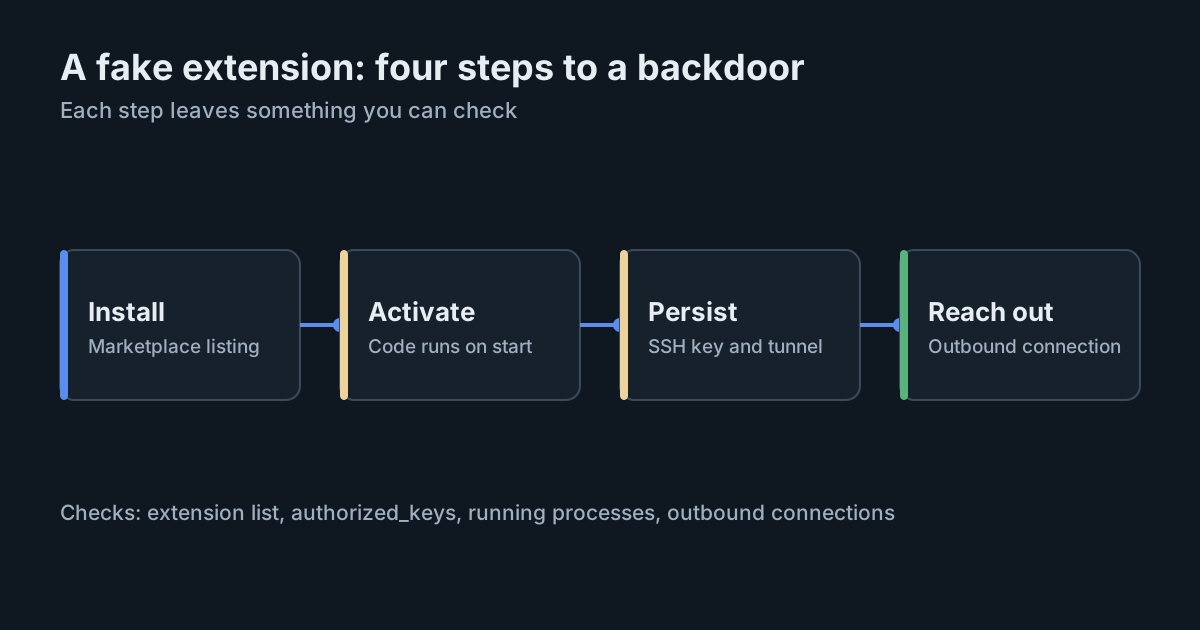
On 29 October 2026, for about eleven hours, Cursor's own extension marketplace served a modified build of the Claude Code extension that tried to turn developer machines into SSH endpoints for an attacker. Cursor's security notice names the affected builds as Anthropic.claude-code 2.1.312 and 2.1.313 for Windows and macOS. The builds were not made by Anthropic, and the attacker's server has since been taken offline. Anyone who installed or updated the extension in that window still has work to do, because removing the extension does not remove what it left behind.
What happened
According to Cursor, the tampered builds were available from about 2:27am to 1:35pm Pacific time on 29 October, which is roughly 09:27 to 20:35 UTC. Cursor says it removed the version as soon as it was detected, then shut down the whole marketplace, audited access, rotated its keys, rebuilt the marketplace and brought it back online. It says it found no other tampered extensions.
The Microsoft Security analysis, published on 30 October, adds that the malicious packages were never published to the Visual Studio Marketplace or npm, and that Anthropic's own systems were not compromised. The problem was the distribution point, not the publisher.
What the payload did
Both sources describe the same chain of actions:
- Reconnaissance. It collected the hostname, user name, operating system, home directory, working directories, Git email address and public IP address, plus the names of environment variables. Microsoft says it looked for names matching patterns such as KEY, TOKEN, SECRET, PASS, AWS and GCP, and collected names only, not values.
- An SSH key. It appended an attacker-controlled public key with the comment
svc-telemetryto the user'sauthorized_keysfile. - A reverse tunnel. It tried to enable the local SSH service and open a reverse SSH tunnel to the attacker's server, retrying roughly every 60 seconds.
- Persistence. On macOS, a LaunchAgent labelled
com.apple.sysmond. On Windows, a scheduled task calledSysMonthat tries to run as SYSTEM, with asysmon.cmdfile in the Startup folder as a fallback.
Cursor's notice is careful about impact. Turning on the SSH service needs administrator rights, which the extension does not have on most macOS and Windows machines, so on those machines that step fails and the attacker could not have logged in through the tunnel. The key, the persistence and the host details were still sent or installed. Cursor's advice is to follow the clean-up steps regardless.
Where the sources differ
Cursor's notice, as updated on 30 October at 11:30am Pacific time, names two versions: 2.1.312 and 2.1.313. Some early third-party write-ups mention only 2.1.313. Cursor's update says it "clarified affected versions", so use its list. Some secondary reports also quote a figure for how many users may have installed the build and attribute it to Cursor. That figure does not appear in Cursor's current notice, so treat it as unconfirmed.
Checking and cleaning up
Cursor's notice gives one quick test: look for svc-telemetry in the SSH authorized keys file. On macOS that is ~/.ssh/authorized_keys. On Windows, also check C:\ProgramData\ssh\administrators_authorized_keys. If the key is there, the machine is affected. The notice then lists these steps:
- Search endpoint, network and extension-installation telemetry for the published indicators. These include the SHA-256 hashes of the modified packages, the attacker's IP address, and processes such as
ssh -N -Randautossh. - Isolate machines that show signs the payload ran.
- Remove the key, the persistence entries and any running tunnel processes, and decide whether to rebuild the machine. Cursor provides remediation scripts for macOS and Windows.
- Rotate credentials and sessions that were reachable from affected machines, from a trusted system. Cursor notes that collecting only variable names "does not rule out later credential access over the backdoor".
What it means for engineering and security leaders
- Extension marketplaces are part of your supply chain. A trusted publisher name on a listing guarantees nothing if the store serving it is compromised. This build carried Anthropic's name but came from Cursor's marketplace.
- Auto-update is a speed of exposure, not only a convenience. The bad builds were live for about eleven hours. Machines that updated extensions automatically during that window received them without anyone deciding to.
- Developer machines hold the keys. The payload went straight for SSH access and for the names of credential variables. A developer laptop with cloud, Git and model provider credentials is a high-value target, and an editor extension runs with that developer's rights.
- Uninstalling is not remediation. The persistence ran outside the extension. Incident plans for editor extensions need the same steps as any other malware: find, isolate, clean or rebuild, rotate.
Practical takeaways
- Search every macOS and Windows machine that runs Cursor for the
svc-telemetrykey today, even if nobody remembers updating the extension. - If you manage Cursor centrally, read its security hardening guide. It describes an allowed-extensions list, an extension install cooldown that can be enforced across a fleet, optional signature verification, and Workspace Trust settings delivered through device management. Microsoft's analysis also recommends restricting extensions to approved publishers and adding a cooldown before new versions install.
- Treat a cooldown as a real control. A delay of a day or two before new extension versions install would have kept these builds off machines entirely, because they were removed the same day.
- Keep an inventory of which AI tools and extensions run where, so the next notice becomes a short query rather than a survey. The pattern is familiar from abandoned AI extensions and from poisoned rule files.
If you use SpanDock, process inventory can help with the "where does this run" part. It shows which AI tools run on your team's computers, and at its "All processes" level it lists every running program by name and path, so unexpected ssh or autossh processes stand out. It never collects command-line arguments or environment variables, so it complements the published indicators rather than replacing an endpoint security tool. Process inventory is on the Enterprise plan and is off by default.
Sources
- Cursor: Security notice, malicious version of Anthropic.claude-code (2.1.312 and 2.1.313) in the Cursor VS Code Extension Marketplace (29 October 2026, updated 30 October)
- Microsoft Security blog: Inside a malicious Claude Code-branded Cursor extension and its persistent SSH backdoor (30 October 2026)
- Cursor documentation: Enterprise security hardening (allowed extensions, install cooldown, workspace trust)