
GPT-6.1 Terra for coding agents: half Sol's price, and where it stops
OpenAI's GPT-6.1 Terra arrived on 26 October in the API and in Copilot. What it costs, what the benchmarks say and which coding work to route to it.
OpenAI released GPT-6.1 Terra on 26 October 2026, and GitHub made it generally available in Copilot the same day. Terra is the cheaper, faster sibling of GPT-6.1 Sol. For teams paying for coding agents by the token, the question is simple to ask and harder to answer: which part of our agent work can move to the cheaper model without making it worse? This article sets out the prices, what the published results do and don't show, and a way to test the move.
The prices
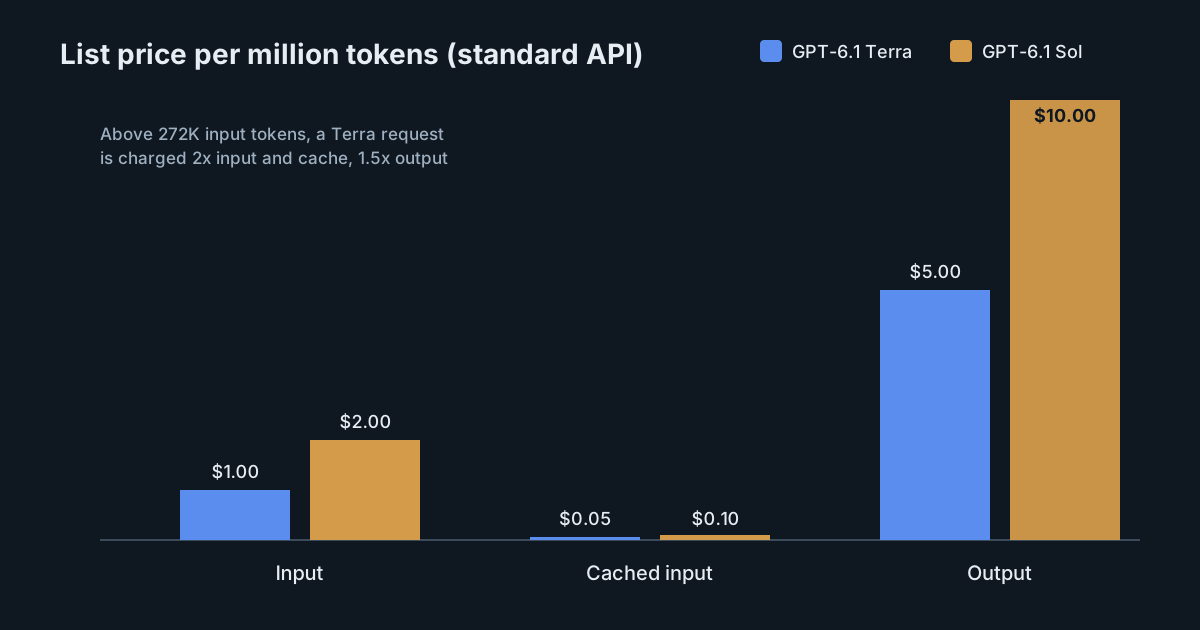
OpenAI's standard API prices for Terra are $1 per million input tokens, $0.05 per million cached input tokens and $5 per million output tokens. The announcement says these are 50% lower than both GPT-5.6 Terra and GPT-6.1 Sol. That matches Sol's published prices of $2, $0.10 and $10, which we looked at when Sol came out.
| Per million tokens | GPT-6.1 Terra | GPT-6.1 Sol |
|---|---|---|
| Input | $1.00 | $2.00 |
| Cached input | $0.05 | $0.10 |
| Output | $5.00 | $10.00 |
The model page adds the details that decide real bills:
- Context: a 1,050,000-token context window, with up to 922,000 input tokens and 128,000 output tokens. The knowledge cut-off is 1 June 2026.
- Long prompts cost more. Above 272,000 input tokens, the whole request is charged at twice the input and cache rates and 1.5 times the output rate. A long-context Terra call therefore pays $2 per million input tokens, the same as Sol's standard input rate.
- Cache writes are priced. Writing to the cache costs $1.25 per million tokens for the 30-minute retention and $2.50 per million for the 12-hour one. Our earlier piece on when 12-hour caching pays off applies here unchanged, at Terra's lower numbers.
- Other modes: Batch and Flex are 50% lower, regional processing adds 10%, and Fast mode doubles the price. Tool calling requires the Responses API.
What the benchmarks show
OpenAI reports that, at maximum reasoning effort, Terra solves 50.3% of Terminal-Bench 4.0 tasks, against GPT-5.6 Terra's published 21.5%. That is a large step for the cheaper tier. It is also a vendor-reported number, at maximum effort, on one benchmark and one harness. Most of the launch post's headline results are about computer use, visual reasoning and writing, not code.
OpenAI is clear about the ceiling: "For the most complex coding tasks, GPT-6.1 Sol and GPT-6 Astra remain the better choice." GitHub's framing is similar. Its changelog describes Terra as designed for "everyday agentic coding and terminal work" and says it "works in focused, consolidated steps on well-scoped tasks". GitHub also says that in early testing Terra solved noticeably more terminal and C# tasks than GPT-5.6 Terra, without publishing figures.
Both sources point the same way: Terra for bounded, well-specified work; Sol or Astra for long, ambiguous changes. That is a routing decision, not a replacement.
One more line in the announcement deserves attention from security teams. OpenAI says Terra "meets the Critical threshold in cybersecurity under our Preparedness Framework" and keeps the protections built for GPT-6 Astra. A cheaper model with that rating makes capable offensive use cheaper too, which is a reason to keep agent permissions and network access tight whichever model runs.
In Copilot
Terra is available to Copilot Pro, Pro+, Max, Business and Enterprise users, in the model picker across the IDEs, the CLI, the cloud agent, the Copilot app, github.com and GitHub Mobile, with a gradual rollout. It is billed at provider list pricing under usage-based billing.
For administrators, one sentence in the changelog matters most: under default model enablement, "new models are automatically enabled unless an administrator has turned off the global default or explicitly disables this model." If you review models before developers can use them, check that setting now. We described how to manage it programmatically in the Copilot model policy API.
Where Terra fits in a coding workflow
Good candidates for the cheaper model:
- Sub-agent work: searching a codebase, summarising files, collecting test output, drafting commit messages.
- Well-scoped fixes with a clear failing test or lint error.
- Terminal chores: dependency bumps, build fixes, scripted migrations with a checklist.
- High-volume, low-risk jobs in CI, where Batch or Flex pricing also applies.
Keep on Sol or Astra, at least until your own tests say otherwise:
- multi-file refactors with unclear boundaries;
- debugging where the cause is not yet known;
- design work and anything security-sensitive that needs careful reasoning.
How to test the move
- Pick real tasks. Take 20 to 50 recent tasks from your own repositories, with known good outcomes.
- Run both models in the same harness, at the reasoning effort you would actually use, and repeat each task a few times. Single runs hide variance.
- Measure cost per accepted change, not cost per token. A cheaper model that needs two extra attempts, or more review time, may cost more.
- Watch prompt length. Agent sessions that grow past 272,000 input tokens lose much of Terra's price advantage; compaction or a fresh session can matter more than the model choice.
- Decide per task type, and write the rule down so it can be revisited when the next model ships.
What it means for engineering and security leaders
Terra halves the list price of OpenAI's capable tier for work it handles well, and both OpenAI and GitHub say plainly that it is not the model for the hardest coding tasks. The savings come from routing, and routing needs evidence from your own tasks. Check your Copilot model enablement, test before switching defaults, and keep the long-context surcharge in mind when you estimate costs.
If your tools' calls go through the SpanDock model proxy, routing rules (Premium plan and up) can send chosen requests to a different model, per-person budgets (Standard plan and up) keep spend within limits, and price overrides under Settings → Model prices let cost estimates use the prices you actually pay.