
MCPhantom: coding agents installed archived MCP servers from memory
Glow Labs found coding agents choosing archived MCP servers they remembered from training. What the research says, what public records show, and how to check.
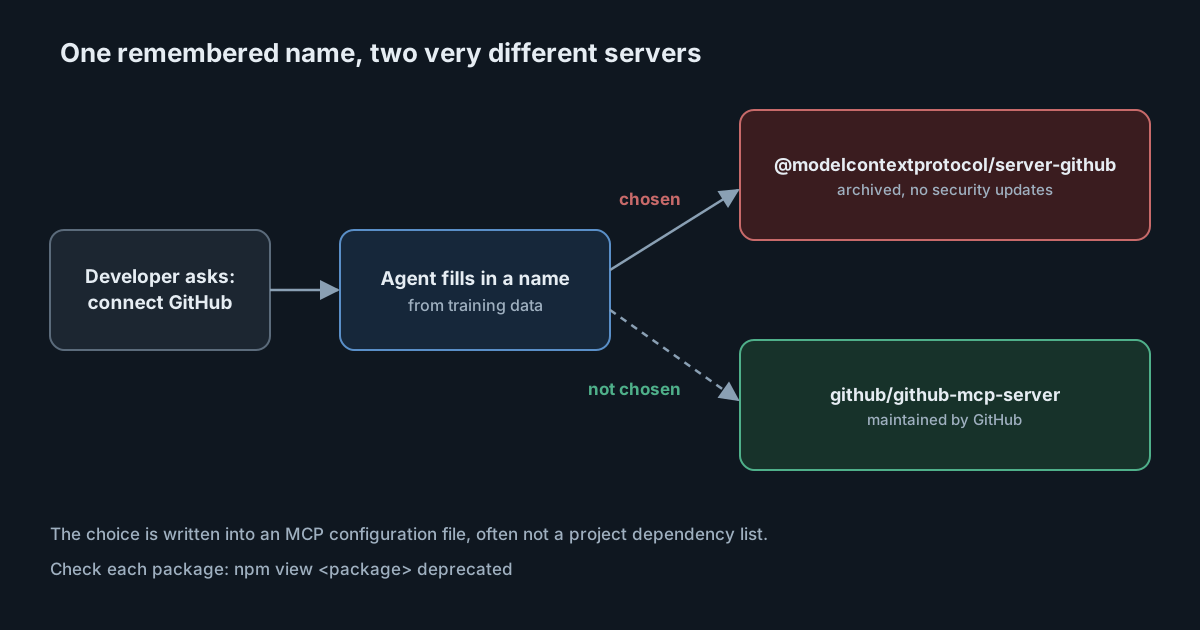
When a developer tells a coding agent to connect to GitHub, the agent has to name an MCP server. Research published by Glow Labs at the start of November says that agents often fill in the name from memory, and that the name they remember belongs to a server that has since been archived. Glow calls the pattern MCPhantom: retired servers that keep turning up on developer machines because a model still knows them. Nobody has to be attacked for this to matter. The agent installs software that will never get a security fix, and nothing on the screen says so.
What Glow Labs reports
Glow's report is based on real coding session transcripts and an endpoint inventory. It says it found sessions in which an agent set up deprecated Anthropic reference MCP servers on developer machines. The main claims:
- Who chose the package. In 98% of the sessions where an agent set up a deprecated server, the report says the cause appears to be the model's training data. In the other 2%, the user asked for the old package by name.
- Which tools. The pattern appeared in Claude Code, Cursor, Codex CLI, Claude Cowork and Claude chat, and across three model providers, so no single vendor's change would close it.
- How it happens. A developer asks for a service. The agent writes the configuration itself or gives the developer the command, and
npxinstalls the package. - What is at stake. Glow reports four high-severity vulnerabilities across the original servers, including a remote code execution flaw in the Puppeteer server that a prompt injection could trigger. It says the maintainers confirmed no fix will come. According to Glow, they replied that the server was archived in May 2025 and "is unmaintained, so no fix or release will come from this repository".
- How widely used. Glow counts 17,352,267 downloads of twelve deprecated packages since 10 July 2025, led by the GitHub, Postgres and Slack servers.
Glow says it has seen no exploitation. It also sells endpoint inventory and policy tooling for AI tools, so read its framing with that in mind. The facts above are still checkable.
What the public records show
These checks were made on 6 November 2026.
The archive repository is marked archived. Its README says these servers are "no longer maintained" and that "No security updates or bug fixes will be provided". It points readers to the maintained servers repository.
The npm registry metadata for the latest version of each of Glow's twelve packages carries a deprecation message. Three, the GitHub, Postgres and Puppeteer servers, read "Archived and unmaintained; no security guarantees", with a link to the archive. The other nine read "Package no longer supported". The Puppeteer package's registry record shows a last-modified time of 5 November 2026, but the record doesn't show what changed, so no conclusion about timing follows. A deprecation message adds a warning; it doesn't remove the package. The Slack server's tarball could still be downloaded.
Two counts differ. The archive README lists 14 servers, including some that are not npm packages. Glow's table covers twelve npm packages, and its text says 13 were archived. This article doesn't reconcile them, and they don't change the advice. The Glow page also carries two dates, 2 November on the post and 5 November beside the author, which suggests it was revised.
Why the usual tools stay quiet
Glow's argument is that an npx-launched MCP server sits outside the places security tools look. Its table says endpoint detection sees a trusted Node process installing a public package, dependency scanners find nothing because the server is in no project manifest, the agent's own guardrails don't know the package is deprecated, and software inventories don't list it as an installed application. Glow also says the vulnerabilities have no CVE, so a scanner keyed on CVEs would not flag them.
Those are Glow's claims about categories of tools, and some products will behave differently. The underlying point is sound, though. An MCP server launched with npx is a dependency that is named only in a configuration file, and the agent may have written that file a minute ago. An earlier article looked at an MCP server entry being a command: the entry decides what runs on the machine, so the entry deserves review.
There is also a gap in how models learn names. A model remembers that @modelcontextprotocol/server-github was the way to reach GitHub. It has no feed telling it that GitHub now maintains its own official server, and the old package still installs.
What it means for engineering and security leaders
Treat the choice of MCP server as an approval, not a convenience. A developer who asks an agent to "connect GitHub" is choosing which code receives their repository token, and the agent is making that choice on partial memory. Two controls follow:
- One approved server per service. Pick the vendor-maintained server for each service, write the name down, and make it the standard. An agent that has to pick from a short approved list has less room to guess.
- Deprecation status as an approval criterion. Before approving any MCP server, check whether its package is deprecated, whether its repository is archived and when it last released.
The replacement is not always another npm package. The right answer is whatever the service owner documents today.
Practical takeaways
-
Search the configurations. Look in each AI tool's MCP configuration files, including project files such as
.mcp.json, for packages that start with@modelcontextprotocol/server-. The maintained servers use that prefix too, so check each hit. -
Check each package's status:
npm view @modelcontextprotocol/server-github deprecatedAny message in the output means the package is deprecated. Compare the name with the archive repository's list.
-
Replace, don't just remove. Switch to the service owner's own server where one exists, and tell the developers what to use so the agent doesn't reinstall the old one.
-
Name the approved servers in agent instructions. A short list in project or organisation guidance gives the agent something better than memory.
-
Review new MCP entries in code review. Treat a change to an MCP configuration like a change to a build script.
-
Add deprecation and archive checks to your approval checklist for any new MCP server, whoever suggests it.
Where a gateway fits
The SpanDock MCP gateway documentation says the gateway gives every computer's AI tools one MCP server and connects it, on your server, to your organisation's connectors, which you pick from a catalogue that includes GitHub, Linear, Notion and Slack. It also says that when a computer's gateway setting is Enforced, SpanDock reports, or moves aside, the AI tools' other MCP servers. The MCP gateway is on the Premium and Enterprise plans. The page says nothing about spotting deprecated packages, so a catalogue and an enforced setting narrow the choice of servers, but they don't replace checking the servers you approve.