
The tool update gap: why agent tools must be re-checked when their code changes
New research shows a tool approved once can turn malicious in an update that prompt-injection defences never see. What it found, its limits and what to change.
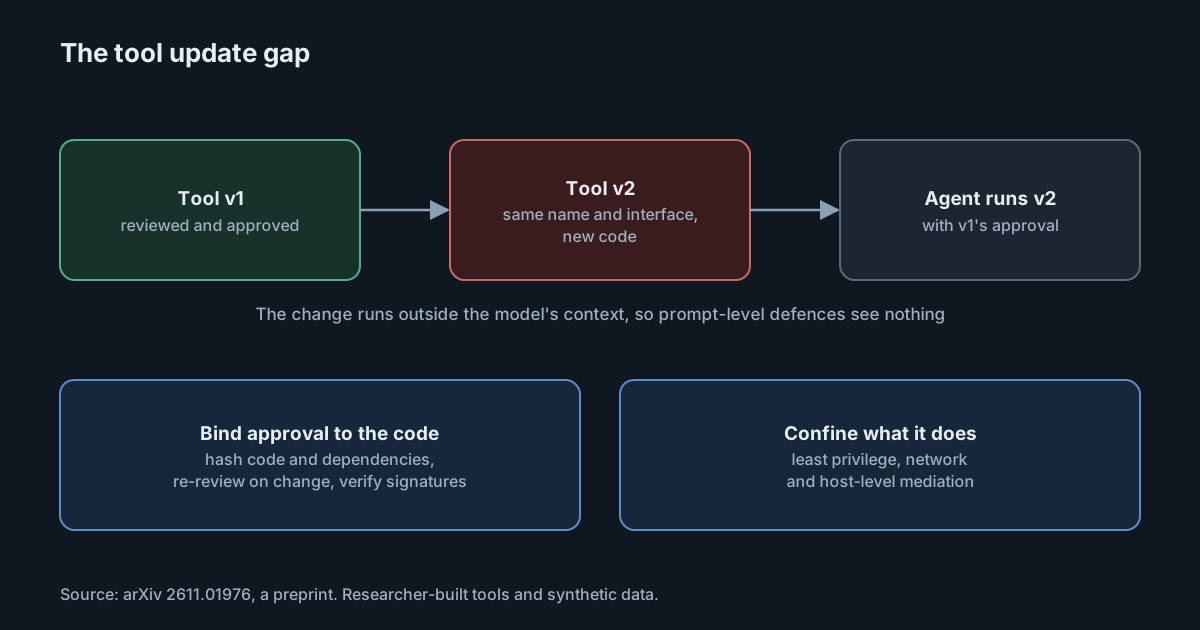
Most defences for AI agents watch what the model sees: prompts, tool descriptions, tool results. A paper posted to arXiv on 1 November 2026 looks at what they miss. When an agent framework approves a tool once and keeps trusting it after its code is updated, a malicious update can act inside the tool's normal work, where no model-facing defence can see it. The authors call this the tool update gap. Their attack worked across seven popular agent frameworks, and the defences they tried either missed it or blocked legitimate updates too. If your developers add tools, skills or MCP servers to coding agents, the paper is a useful prompt to ask when those tools are checked.
What the paper studies
Beyond Prompt Injection: The Tool Update Gap in LLM Agent Security is by researchers at Shanghai Jiao Tong University and Inria. It is a preprint, so it hasn't been peer-reviewed yet.
The idea is simple. An agent framework admits a tool, perhaps after a review. Later the tool is updated: new code, same name, same interface. Many frameworks keep the earlier trust and run the new code without checking again. Because the tool's code runs outside the model's context window, a malicious change never appears in anything the model reads. Defences that inspect prompts or tool output have nothing to inspect.
The authors' attack, ETUDE, puts malicious operations into an update of a tool that was benign when it was admitted. The update keeps the tool's interface and normal results, and performs its extra operation during ordinary use. They tested three objectives using synthetic credentials and local files: reading a separate credential file, an unauthorised outbound transfer, and modifying a file.
The frameworks tested were Gemini CLI, Codex CLI, Claude Code, DeepSeek Harness, OpenCode, Pi and Goose, at versions listed in the paper.
What it found
The abstract reports a 97.6% attack success rate with a 95.9% legitimate task completion rate, and says ETUDE outperforms the strongest prompt-injection baseline by 85.1%. In the main results section, across 21 framework and workload combinations weighted equally, the figures are 100.0% success and 99.6% completion, against 20.2% success for the strongest baseline, a difference of 79.8 percentage points. The numbers in the abstract and the body differ, presumably because they aggregate different sets of runs; we couldn't find a passage that reconciles them. Either way, the attack succeeded almost every time while the tool kept doing its normal job.
The baselines matter for interpretation. The baselines failed at different stages. Tools that were already malicious when admitted were withheld by the experiment's admission reviewer. Attacks that relied on instructions in the model's context depended on the model acting on them, and the strongest of those succeeded only 20.2% of the time. ETUDE gives the model no instruction to follow or refuse.
Why the defences struggled
The paper tested four kinds of defence, and its results are more useful than the headline numbers.
- File similarity. Comparing the old and new code with a similarity hash couldn't separate malicious updates from legitimate maintenance. A threshold strict enough to block all three attacks also blocked 22 of 40 legitimate updates, including every functional addition.
- Static review by a model. An LLM-based code review rejected 98.3% of readable malicious updates. After the code was obfuscated with PyArmor, a Python code protection tool, the attack still succeeded 85.0% of the time.
- Package scanners. Of two skill scanners tested, one admitted all three obfuscated attacks. The other rejected them, but also rejected all 20 obfuscated legitimate updates, so it blocked by refusing anything it couldn't read.
- Runtime auditing. Running the updated tool in an isolated environment and watching what it did caught the attack in every tested case. But a variant that activated only outside the audit environment's user mapping evaded it, and the audits cost about 6.3 times the latency of static review.
None of this says the defences are useless. It says that each answers a different question, and none answers "is this new code allowed to do what it does?" on its own.
What the authors recommend
The paper's principle is that "authorization must bind to the specific implementation that was examined, not to the tool's identity". It describes two layers:
- Artifact identity. Hash the tool's code and resolved dependencies, and treat any change as needing a new review. Across a distribution channel, the authors point to Sigstore signature verification and SLSA build provenance to catch substituted or re-signed updates.
- Behavioural confinement. Signatures prove which code runs, not what it does, so a maintainer-signed update can still be malicious. Tools should run with least privilege and with host- and network-level mediation, so operations outside the tool's declared purpose are refused when they happen.
Limits of the study
The attacks used tools written by the researchers, with monitored permissions, not modified real-world tools; the authors chose this to avoid ethical problems. The objectives were synthetic. The cost figures come from the tested tasks only. The paper shows the gap exists and is easy to exploit in the frameworks it tested; it doesn't measure how often it is exploited in practice.
What it means for engineering and security leaders
For most organisations, the gap is in process rather than in a specific product. Teams review a tool, a skill or an MCP server when it is first proposed, then let it update itself. That is exactly the pattern the paper exploits. The fix is to make an update a new decision: pinned versions, a review on change, and limits on what any tool can reach regardless of its version.
It also cautions against treating a scanner's pass as proof. A scanner that can't read the code either passes it or blocks it; you need to know which yours does.
Practical takeaways
- Inventory auto-updating tools. List the MCP servers, skills and plugins your agents use, and which of them follow a moving version or branch.
- Pin to exact versions or hashes, and require review when the pin changes, with the code diff, not just the version number.
- Prefer signed, attested releases for tools you depend on, and verify them where you install.
- Confine tools at run time. Run local tools and MCP servers with the fewest permissions and network destinations they need, so an update that tries something new fails.
- Know your scanner's failure mode. Check what it does with obfuscated or binary content, and whether an incomplete scan can still report success.
For a related look at what approval prompts do and don't cover, see what an agent approval actually approves, and for MCP server updates in practice, the MCP reference servers' v2.1.0 fixes.