
Dependabot now updates agent skills in apm.yml: what it covers and skips
Dependabot can open pull requests for agent skills and plugins declared with Agent Package Manager. How pins are updated, what is left out, and how to review.
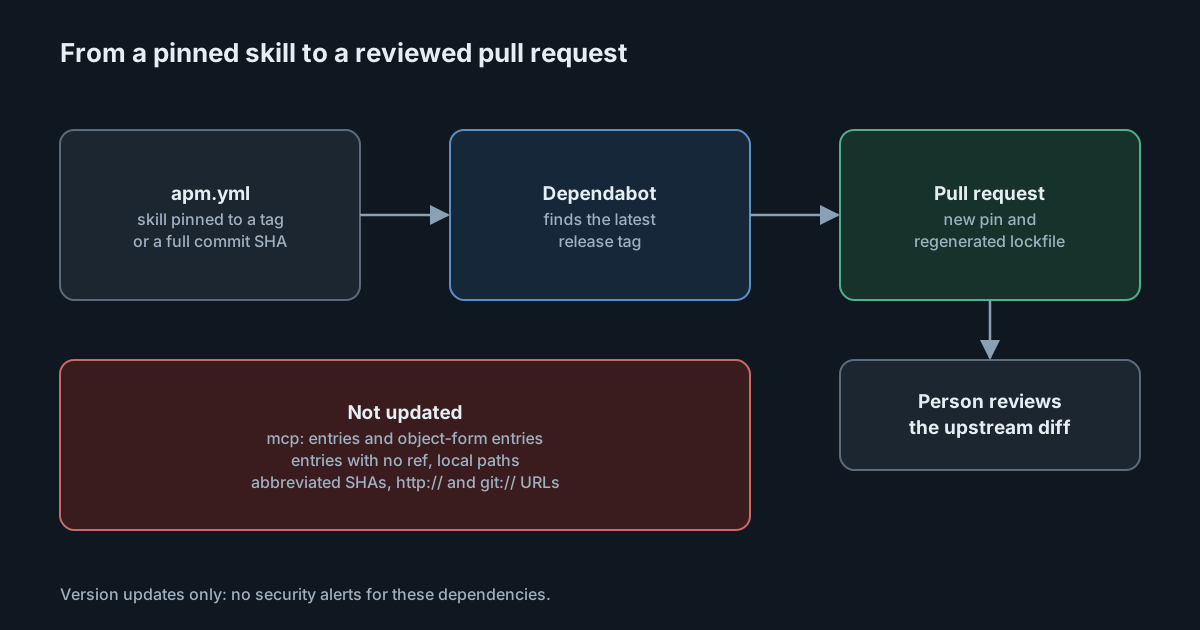
On 3 November 2026 GitHub added Agent Package Manager to Dependabot version updates. If your repositories declare agent skills, prompts and plugins in an apm.yml file, Dependabot can now open pull requests when they have newer releases, and regenerate the lockfile with them. That turns a silent change in what your coding agents are told into a diff someone reviews. It also has clear limits: it doesn't raise security alerts, it leaves several kinds of entries alone, and it doesn't touch MCP servers declared in the same file.
What Agent Package Manager is
Agent Package Manager (APM) is an open-source, MIT-licensed project from Microsoft that describes itself as a dependency manager for AI agent configuration. A project lists its agent dependencies in apm.yml: skills, plugins, agent files and whole packages from git repositories, plus MCP servers. apm install sets them up for the coding tools the project targets, and apm.lock.yaml pins the resolved tree, much as a lockfile does for npm. At the time of writing its latest release is 0.35.0, from 22 October.
Skills and instructions are code in all but name: they shape what an agent does, and some include scripts. Until now, keeping them current meant someone remembering to bump a tag.
What Dependabot now does
According to the changelog post, Dependabot opens pull requests that update supported git dependencies in apm.yml, and regenerates apm.lock.yaml when the repository has one. It is available on github.com for all plans, and the post says it is coming to GitHub Enterprise Server 3.24, so it is not there yet. Enabling it is an apm entry in .github/dependabot.yml, pointing at the directory that holds apm.yml:
version: 2
updates:
  - package-ecosystem: "apm"
    directory: "/"
    schedule:
      interval: "weekly"
These are version updates only. Dependabot security updates and alerts are not part of this, so a vulnerable skill won't be flagged by it.
How each kind of pin is updated
The supported ecosystems reference explains what Dependabot does with entries under dependencies.apm and devDependencies.apm, by how they are pinned:
- A SemVer tag is moved to the latest SemVer tag. Package-scoped tags work too, such as a skill path followed by
#review-v1.4.0. - A full 40-character commit SHA is moved to the commit of the latest annotated, non-prerelease release tag, with the tag written as a comment beside it.
- A branch isn't changed in
apm.yml; only the lockfile is updated, and this needs a lockfile to exist already.
Dependabot runs apm lock to regenerate the lockfile, but it won't create one for you.
What it leaves alone
The same reference lists entries Dependabot doesn't update:
- object-form entries (with
git:,registry:,id:orpath:keys) and everymcp:entry; - entries with no ref at all, and local paths;
- Azure DevOps dependencies, and
http://orgit://URLs; - YAML block scalars and escaped quoted strings;
- abbreviated commit SHAs;
- shorthand entries when
registries.defaultis set.
For private sources, only git registries are supported. Two of these gaps matter most. MCP servers, which often run code or hold credentials, get no update pull requests at all. And entries with no ref are not tracked, so whatever changes upstream reaches you without a Dependabot pull request.
Why a pull request matters for agent dependencies
The value here isn't only freshness. A skill update changes the instructions an agent follows, or the scripts it may run, and in most setups that change arrives with no review. A paper posted to arXiv on 1 November on the "tool update gap" in agent frameworks makes the point sharply: tools and skills are usually trusted once, when added, and not checked again when their code changes. A Dependabot pull request is a natural place to check again. It shows which pin moved, from what to what, and the lockfile diff shows what resolved underneath.
That only helps if the pull request is reviewed like code. A version bump in apm.yml says nothing about what changed inside the skill. The reviewer needs to open the upstream diff between the two tags or commits.
What it means for engineering and security leaders
Agent configuration is becoming a dependency graph, and it now has the same tooling as the rest of your supply chain. Use it, but don't mistake it for coverage. Version updates help with drift; they don't detect malicious releases, and they don't cover MCP servers. Your policy still needs to say which sources are allowed, how entries are pinned and who reviews changes to them.
Pinning to full commit SHAs with Dependabot moving them to release tags gives you both stability and a review point. Tag pins are convenient, but tags can be moved by whoever controls the upstream repository.
Practical takeaways
- Turn it on where you use APM. Add the
apmentry to.github/dependabot.ymland commitapm.lock.yamlif you don't have one. - Pin every entry. Remove entries with no ref, and prefer full commit SHAs for third-party skills.
- Review the upstream diff, not just the bump. Open the changes between the old and new ref, especially for skills that include scripts.
- Route these pull requests to an owner with CODEOWNERS, so agent configuration changes get a named reviewer.
- Track MCP servers separately. List the
mcp:entries and object-form entries Dependabot skips, and decide who checks them for updates. - On GitHub Enterprise Server, wait for 3.24 rather than assuming it works today.
If you'd rather publish your team's skills centrally than through each repository, SpanDock's skills feature, which is in beta, keeps versions of each published skill so you can view any of them and roll back, and each computer checks every file against the server's list before writing it. Skills that run scripts are marked, and computers don't install them unless their settings allow it. Publishing your own skills is on the Premium and Enterprise plans. See also the security rules for skills over MCP.