
Streaming Copilot agent sessions to Agent 365: raw content is on by default
GitHub can now stream Copilot agent activity into Microsoft Agent 365, with prompts, responses and tool results included by default. What to decide first.
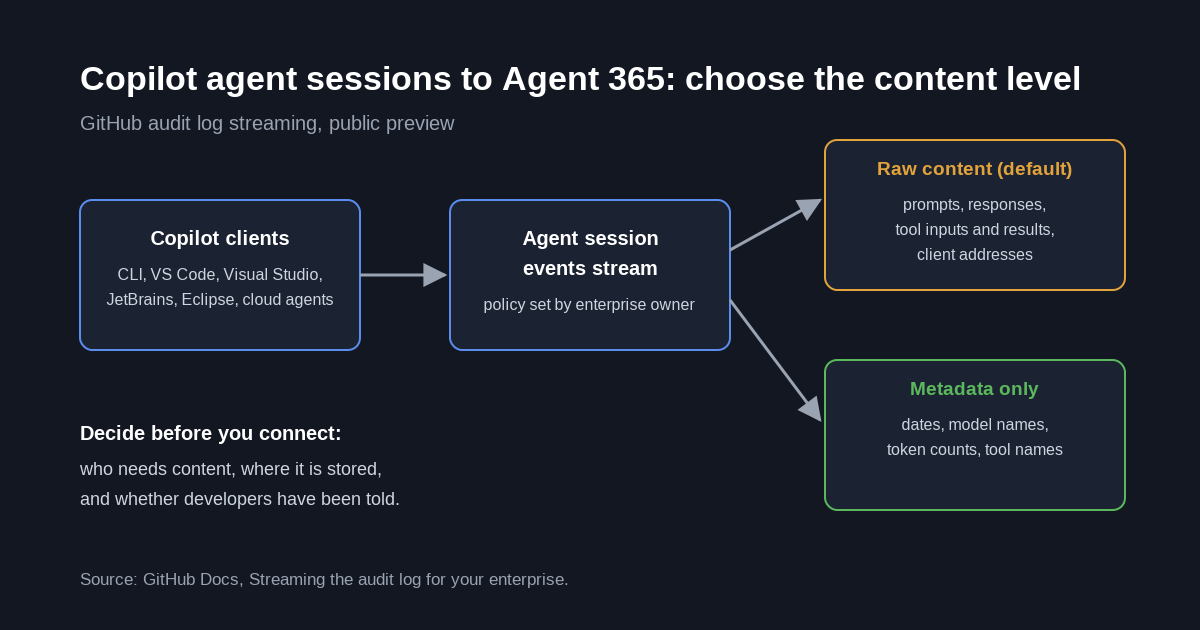
Since 17 November 2026, enterprises on GitHub Enterprise Cloud with Enterprise Managed Users can stream GitHub Copilot agent activity into Microsoft Agent 365, Microsoft's console for watching AI agents across an organisation. It brings sessions from Copilot CLI, VS Code, Visual Studio, JetBrains, Eclipse and cloud agents into one place. It also, by default, copies the content of those sessions: prompts, responses, tool inputs and results, and client addresses. Whether that is what you want is a decision to make before you click through the setup, not after.
What GitHub shipped
The changelog post lists three things administrators can now do:
- see activity across Copilot clients, including cloud agents on GitHub.com, Copilot CLI, VS Code, Visual Studio and partner IDEs such as JetBrains and Eclipse;
- review user sessions, "including prompts, responses, and tool calls", and usage trends in Agent 365;
- use additional risk information in Microsoft Purview and Defender.
Microsoft's overview describes Agent 365 as "the observability platform for AI": an agent registry, governance policies, risk signals from Defender, Entra and Purview, and cost views. It is licensed per user, and Microsoft says it "works best" with Microsoft E5.
How it is set up
GitHub's audit log streaming documentation has the steps. An enterprise owner first turns on the Copilot Usage Records Streaming policy under AI controls → Copilot, in the "Billing & usage" section. Then, under Settings → Audit log → Log streaming, they choose Microsoft Agent 365, authorise the connection with a Microsoft Entra account for the tenant, and choose how much data to share.
Agent 365 receives only Copilot agent session events, not the rest of the enterprise audit log. Microsoft Purview is offered as a separate destination with the same restriction. The other streaming destinations GitHub supports, such as Splunk or Datadog, can carry Copilot agent session events alongside ordinary audit events.
The source texts differ on scope
The changelog presents this as a release for "GitHub Enterprise Cloud customers with Enterprise Managed Users". The documentation marks streaming of Copilot agent session events, and the Agent 365 destination, as public preview, available for enterprises that use Enterprise Managed Users on GitHub.com or GitHub Enterprise Cloud with data residency. Treat it as a preview: GitHub may still change what is sent.
The default worth changing
The key sentence is in the setup steps. When you configure the Agent 365 connection, "Include raw content is selected by default". The documentation spells out what that means: "prompts, responses, tool inputs and results, and client addresses". If you turn it off, only activity metadata is shared, "such as dates, model names, token counts, and tool names". The setting applies only to that connection; other streams are not affected.
For a coding agent, "tool inputs and results" is a wide category. It can include file contents the agent read, command output, error messages with connection strings, and whatever a developer pasted into a prompt. Copying it to a second system is not wrong, but it is a decision about personal data, secrets and source code.
We made the general case in Capturing prompts in AI telemetry is a privacy decision, not a setting. This release is a concrete instance: the default favours capture, and the person clicking through the setup may not be the person who owns that decision.
What it means for engineering and security leaders
There is real value here. Security teams that already investigate in Defender and Purview get Copilot activity where they work, across every client, including cloud agents that never touch a managed laptop. Session-level records of tool calls are what you need after an incident involving an agent.
The cost is a new copy of sensitive data, held under different retention, access and residency rules from your code host. Three questions decide whether raw content is justified:
- Who needs content, and who only needs metadata? Usage trends, model choice and tool counts don't need prompts. Investigations sometimes do.
- Where will the data live, and for how long? GitHub's prerequisites tell anyone with data residency requirements to set up the destination in the right region before enabling streaming.
- Have developers been told? Session content is personal data in many places. Works councils, privacy notices and employment law may apply before the first event is sent.
There is also a coverage question. A stream from GitHub covers Copilot. Developers who use other AI tools, or Copilot with a personal account, won't appear in it. An observability plan built only on one vendor's stream will miss them.
Practical takeaways
- Decide the content level first. If you can't yet answer the three questions above, turn off Include raw content and start with metadata.
- Check the policy and the destination separately. The streaming policy is set for the whole enterprise, and GitHub describes Copilot session events going to the same destinations as other audit events. Check what your existing streams, such as a SIEM, will start receiving.
- Set retention and access in Agent 365 and Purview before turning on raw content, and limit who can read sessions.
- Update the privacy notice for developers if session content will be stored.
- Plan for change. It is a preview; review the event schema and settings again when it reaches general availability.
For teams that collect AI tool telemetry themselves, SpanDock's privacy page describes a different default: when SpanDock configures a tool, it sets the tool to report usage, timing, tokens and cost, not what people typed or what the tool read, and telemetry leaves your network only when you add a destination.