
Copilot Fusion: what routing one request across several models changes
GitHub made Copilot Fusion generally available on 28 October, so several models can share one request. How it bills, what admins control, and its limits.
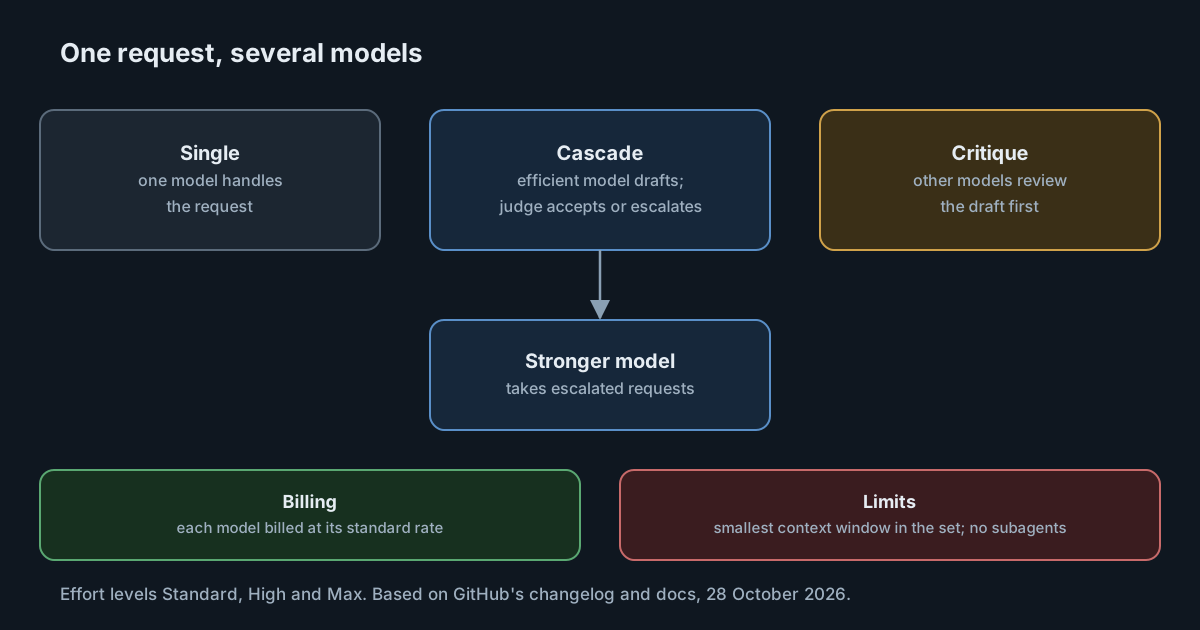
Until now, choosing a model in a coding assistant meant choosing one model per request. On 28 October 2026 GitHub made Copilot Fusion generally available, and that assumption no longer holds. With Fusion selected, a single request can be drafted by one model, judged by another and escalated to a third. For teams that pay for AI usage by the token, that changes how spend is predicted, how model policy is written and how results are explained.
This article covers what Fusion does, how it is billed, the controls administrators get and the limits GitHub documents.
What Fusion is
Fusion is an option in the model picker. Instead of naming a model, the developer chooses an effort level, and Fusion decides which models take part. The documentation lists three selectable levels: Standard, High and Max. A fourth, Fast, is used only for inline chat in Visual Studio Code and can't be selected.
Behind each level sit orchestration patterns:
- Single: one model handles the request, as before.
- Cascade: an efficient model drafts the answer, and a judge either accepts the draft or escalates the request to a stronger model.
- Critique: other models review the work before it is returned.
The two sources describe Critique slightly differently. The changelog says one model reviews another's output; the documentation describes several models critiquing in parallel, with their findings combined. The difference matters if you are trying to estimate how many model calls a Max request makes, so treat the documentation as the more detailed description and expect it to change.
In the client, hovering over the effort level shows which models it currently uses. Fusion is available in Visual Studio Code, the Copilot app, Copilot CLI and JetBrains IDEs. GitHub says support for more clients is coming soon, so don't plan around clients not on that list.
How it is billed
Fusion has no separate charge. Each model that takes part in a request is billed at its standard rate. A Cascade request whose draft is accepted costs the efficient model's tokens plus the judge's. One that escalates costs all three. Through 30 November 2026, GitHub is applying a 30% discount to the model costs of Fusion requests on paid plans.
That has two consequences for anyone forecasting spend:
- Cost per request becomes a distribution, not a rate. With a named model you could multiply tokens by a price. With Fusion, the same prompt can cost very different amounts depending on whether the judge escalates.
- The discount ends. If you pilot Fusion in November, record what usage would have cost at standard rates, or your December budget will be set on numbers that no longer apply.
GitHub also quotes a benchmark result: on the Artificial Analysis Coding Agent Index, Fusion at Max effort scored 60, within two points of Claude Code with Opus 5.5 at Max effort, at roughly half the cost and tokens and in about 40% less time. That is GitHub's own claim about one index. It is a reason to run your own comparison on your own repositories, not a substitute for one.
What administrators control
Fusion only uses models that enterprise and organisation policies have already enabled. A model that is switched off for your organisation doesn't appear inside Fusion either. Administrators can also disable individual models for Fusion only, keeping them selectable directly while excluding them from orchestration, and can make Fusion the default through enterprise managed settings.
That gives three decisions to make:
- Which models Fusion may use. Check this list deliberately rather than inheriting it. A model that is fine for a developer to choose by hand may not be one you want a judge escalating to automatically, for cost or data-handling reasons.
- Whether Fusion is the default. Making it the default moves the model decision from people to a router across your whole enterprise. Do it after a pilot, not before.
- Which effort levels are acceptable. Max is where Critique and escalation are most likely. If budgets are tight, guidance on when to use Max matters more than any setting.
The documented limits
The documentation is candid about several behaviours that are easy to miss:
- No context window of its own. Fusion uses the smallest context window among the models it is using. A long conversation that fits a large-context model can be truncated when a smaller model is in the set.
- Discarded drafts are not undone. If a draft made edits in the workspace and the judge then escalates, those edits stay. The stronger model works on top of them. Review the final diff, not only the final answer.
- No subagents. Fusion doesn't start subagents, so workflows that rely on them still need a named model.
- Routing happens at cache boundaries. Fusion switches models at cache boundaries rather than at arbitrary points in a conversation, which is relevant if you are comparing its cost with a single cached model.
Fusion can also use local models, in public preview. Treat that as an experiment. A local model in the set means part of a request runs on the developer's computer, which changes both cost and where code is processed.
What it means for engineering leaders
Fusion is a sensible design. Most requests don't need the most capable model, and letting an efficient model try first, with a judge to catch the hard cases, is how many teams already route API traffic by hand. The difference is that the router is now inside the vendor's product, and the question "which model wrote this?" has a less direct answer.
Three things become more important as a result. Your model policy is now also your routing policy, so review it with that in mind. Your usage reports need to show cost per request over time, not only per model, to see whether escalation rates drift. And your developers need to know that a Fusion answer may be the product of several models, some of which they did not pick.
Practical takeaways
- Pilot Fusion with a small group before making it the default, and compare its cost and quality with your current default model on real tasks.
- Review the models enabled for Fusion, and disable for Fusion any model you don't want used automatically.
- Record pilot costs at standard rates as well as discounted ones, so planning survives the end of the 30% discount on 30 November.
- Tell developers that edits from a discarded draft remain, and that the final diff is what needs review.
- Keep a named model for long-context work and for anything that uses subagents.
- Leave local models in Fusion off unless you have decided where that code may be processed.
For tools that call model providers with API keys, the SpanDock model proxy does a similar job on your own server: rules or SpanDock Mind choose the model for each call, and every call records the requested model, the model that answered, how the choice was made and what it cost. Budgets and SpanDock Mind are on the Standard plan and up; routing rules are on Premium and Enterprise.