
Copilot included with GitHub Enterprise: no seat fee, no included credits
GitHub Enterprise Cloud can now include Copilot with no seat charge, with all AI usage metered from the first request. What to set up before switching.
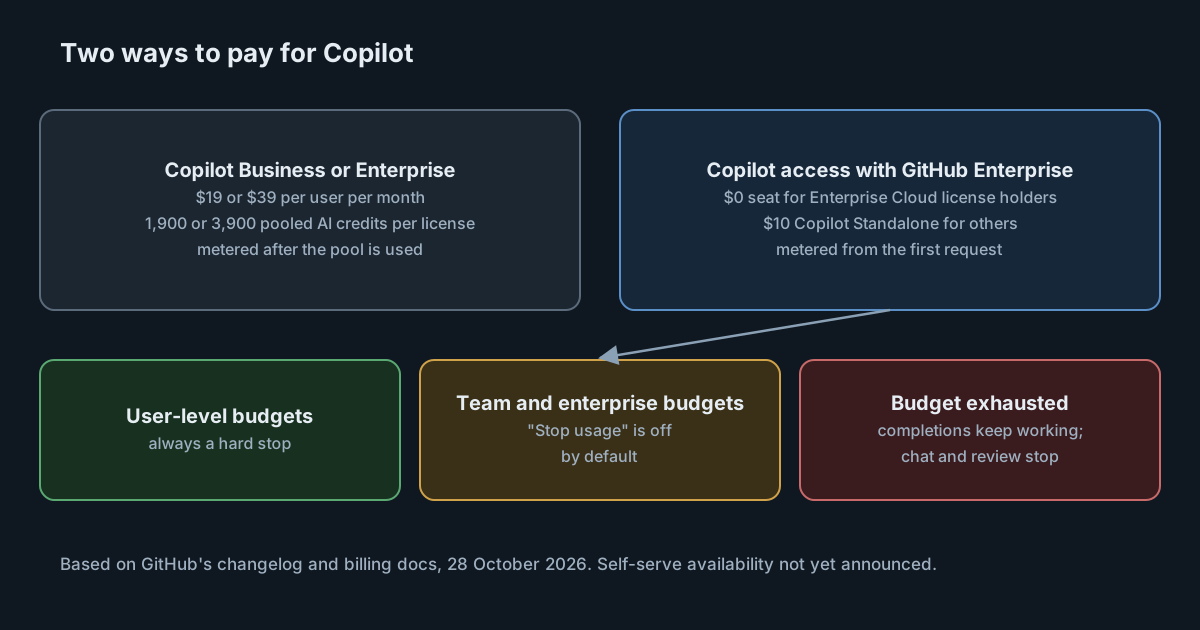
For most of its life, paying for Copilot meant counting seats. On 28 October 2026 GitHub announced a different arrangement: GitHub Enterprise Cloud can now include Copilot access for its licensed users, with no seat charge and no included credits. Every request that consumes AI credits is metered from the first one. In GitHub's words, "usage against your enterprise budget is the primary thing to manage."
That moves the work for platform and finance teams from license counts to budgets. This article sets out what the new arrangement includes, who can get it now and what to configure before switching.
What the arrangement is
According to the documentation on the change:
- Users with a GitHub Enterprise Cloud license get Copilot access with a seat charge of $0.
- Users in the enterprise without that license can get the same access through Copilot Standalone, at $10 per user per month. GitHub describes that fee as covering identity, policy and administration, not usage.
- Features and models are the same as Copilot Enterprise.
- There are no monthly AI credits per seat. For comparison, Copilot Business is $19 per user per month with 1,900 pooled AI credits per license, and Copilot Enterprise is $39 with 3,900.
There is a small difference in wording between the sources. The changelog says Copilot is included "for every licensed user". The documentation says seats still have to be assigned to users. Read it as included in the price, not switched on automatically.
Who can get it, and when
The arrangement is available now for GitHub Enterprise Cloud customers who work with a GitHub or Microsoft account team. For self-serve customers it is, in the changelog's words, "currently unavailable"; GitHub says it is opening it in stages and will share dates. GitHub Free and Team, and self-service trials, are not covered.
Switching is voluntary. Copilot Business and Copilot Enterprise remain on sale, and existing self-serve subscriptions are unaffected. The documentation says a switch takes effect on the first day of a month, and that the new model can't be mixed with Business or Enterprise seats in the same enterprise. An enterprise is on one model or the other.
What still works without budget
The changelog divides features into two groups:
- Code completion and next edit suggestions keep working with no budget available.
- Copilot Chat, Copilot code review and Copilot in the cloud need available budget.
It also says an exhausted budget "never removes access": the seat and the features that don't need budget stay. That is a useful guarantee, but it means the failure mode of a budget set too low is not an outage. It is developers losing chat and review mid-month while completions carry on, which is easy to mistake for a Copilot problem.
How the budgets work
The budgets documentation explains that, without an included pool, every credit is metered. Four kinds of control apply together:
- User-level budgets cap each person's consumption. A universal one applies to every licensed user, a cost centre one overrides it for that cost centre's members, and an individual one overrides both. User-level budgets always stop usage when reached.
- Cost centre budgets limit a group's metered charges.
- Organisation budgets limit charges for seats billed to an organisation.
- The enterprise budget limits total metered charges.
The detail most likely to catch people out: for cost centre, organisation and enterprise budgets, the setting "Stop usage when budget limit is reached" is off by default. Without it, those budgets only send alerts and charges keep accruing. The documentation advises turning it on whenever you create a budget.
Two further rules shape the design. Whichever applicable budget has the least headroom left blocks the user first. And raising a team budget does not unblock someone who has hit their own user-level budget. Individual budgets can now carry an expiry date, which is the tidy way to raise one person's limit for a sprint or an incident.
There is also a policy to keep in mind. With no included pool, the AI credits paid usage policy has to be enabled from the first use of any feature that consumes credits. The change documentation says it is on by default; if someone has turned it off, chat and review will not work at all.
What it means for engineering and finance leaders
For an enterprise already paying for GitHub Enterprise Cloud, removing a $19 or $39 seat fee is significant. Whether it saves money depends entirely on usage. Under Business or Enterprise, light users were covered by the pooled credits their seats bought. Under the new arrangement, those credits don't exist, and the bill is the sum of what people actually use. An organisation with many occasional users and a few heavy ones may pay less. One with broad, heavy use of chat, code review and Copilot in the cloud may pay more.
The other change is who manages what. Seat counts were a procurement question. Budgets are an operational one: someone has to set them per person and per team, watch them, and answer requests to raise them. Plan for that before the first of the month you switch.
Practical takeaways
- Estimate the bill from current usage. Take recent AI credit consumption per user, set it against the seat fees you would no longer pay, and look at the spread between light and heavy users.
- Set a universal user-level budget before the switch, so nobody's first request is unlimited.
- Turn on "Stop usage when budget limit is reached" on every cost centre, organisation and enterprise budget you create.
- Check that the AI credits paid usage policy is enabled.
- Add
*.enterprise.githubcopilot.comto firewall and proxy allowlists, as the change documentation asks. - Tell developers that when budget runs out, completions keep working but chat and review stop, and who to ask for more.
- If you manage your own subscription, wait for GitHub's dates rather than planning around self-serve availability that has not been announced.