
goose terminal integration sent shell history to the model provider
CVE-2026-111079: goose's @goose shell integration sent every command typed, secrets included, to the model provider. goose 1.56.0 makes history opt-in.
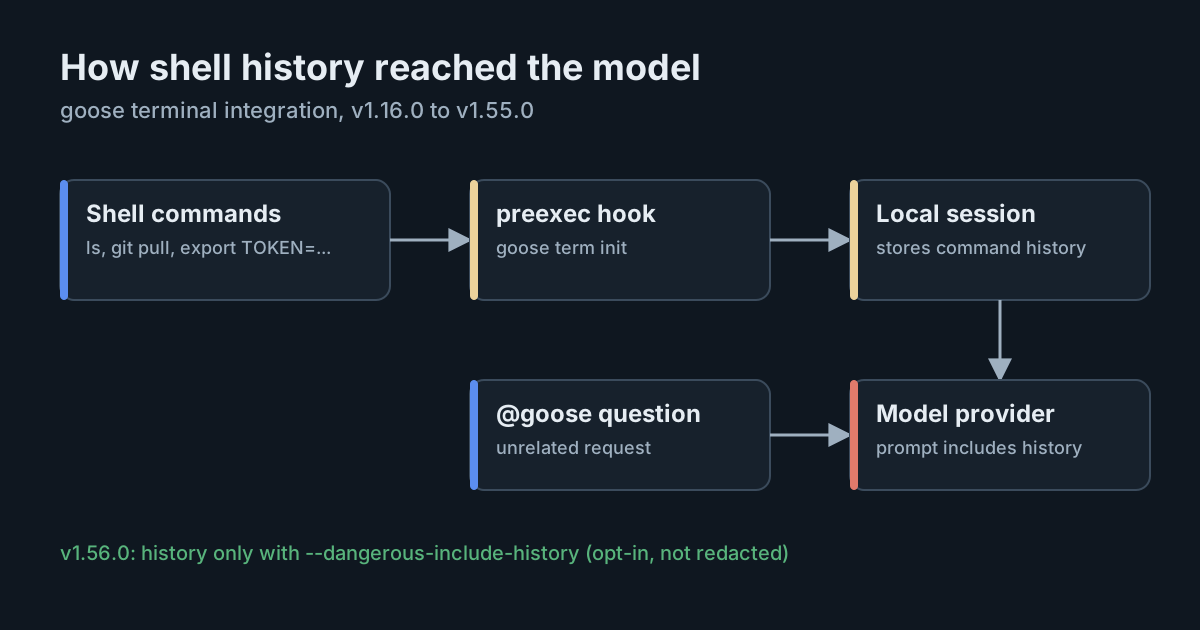
goose, the open-source agent now hosted by the Agentic AI Foundation, can be called straight from a shell prompt by typing @goose and a question. Until recently, setting that up also installed a hook that recorded every command typed in the shell and sent them, unchanged, to the model provider with the next question. CVE-2026-111079 covers that behaviour. goose 1.56.0 turns the recording off by default, but anything typed while it was on has already left the computer.
What the integration did
The terminal integration is set up with one line in a shell's start-up file, such as eval "$(goose term init zsh)". It defines @goose and @g, so a developer can ask about an error without opening a separate session.
According to the report in Red Hat Bugzilla, the generated script also installed a shell hook that ran before every command and logged it. When the person next typed @goose, every command logged since the previous answer was sent as context to the configured model endpoint, verbatim and without sanitisation, whether or not the question had anything to do with them. In the current code, those logged commands are stored as messages in goose's local session, which is how they reach the next request.
The report's examples are ordinary working habits:
- a
curlwith anAuthorizationheader carrying a personal access token; exportlines setting a cloud secret key, a token or a database URL with a password in it;- a cloud CLI command that sets a secret access key.
Ask "what does the -r flag do in cp?" after any of those, and the secrets went to the provider with the question.
Severity, versions and the fix
Red Hat rates the flaw Important, with a draft CVSS 3.1 score of 7.4: network attack vector, user interaction required, changed scope and high confidentiality impact, with no integrity or availability impact. It is classed as CWE-497, exposure of sensitive system information. Red Hat made it public on 22 October 2026 and credits Rodolfo Olivieri, Manuel Moran and Theofanis Petkos of Red Hat. Its statement notes that ordinary non-interactive use, and sessions without the terminal hook, are not affected.
The behaviour arrived with native terminal support in v1.16.0. The change that addresses it is pull request 13051, "Add dangerous include history", merged on 21 October 2026 and shipped in goose v1.56.0 on 23 October. It makes history capture opt-in: the hook is only installed when goose term init is run with --dangerous-include-history, which prints a warning that recorded commands, including any credentials in them, will be sent to the model provider. Without the flag, goose has no record of the commands you run.
Two details are worth noting:
- The version ranges disagree. Red Hat's report lists v1.16.0 to v1.54.0 as affected. The fix was merged after v1.55.0 was released on 16 October, and v1.55.0 does not contain it. Treat 1.55.0 as affected and 1.56.0 as the first release with the change.
- The fix is a default, not a filter. With
--dangerous-include-history, commands are still sent as typed. Nothing in the change redacts them. The flag's name is the protection.
The goose repository has not published its own security advisory for this CVE at the time of writing; the details come from Red Hat. The latest release is v1.57.0, from 28 October.
Why this kind of leak is easy to miss
Nothing here was an attack. No one injected a prompt or tricked the agent. A convenience feature collected context broadly, and the context included secrets, because shells are where people type secrets. We made the same point about telemetry that captures prompt content: what an AI tool sends is a data-handling decision, whether or not anyone made it deliberately.
Once sent, the data is outside your control. It sits wherever the provider keeps request data, under that provider's retention terms, and the person who typed it usually has no record that it went. Credentials that don't expire, such as classic personal access tokens and long-lived cloud keys, stay useful to anyone who finds them until someone rotates them. Developer machines are already a prime target for credential theft; a copy in a provider's logs is one more place to lose them.
What it means for engineering and security leaders
- Ask what context an AI tool collects, not just what it does. Shell history, environment variables, clipboard and open files are all useful context and all likely to hold secrets. Your review of an AI tool should cover what it sends with each request.
- Keep secrets off command lines. Tokens passed as arguments and secrets set with
exportend up in shell history, process lists and now, potentially, prompts. Credential helpers, secret managers and short-lived tokens shrink the damage of every leak like this one. - Upgrades don't recall data. Moving to 1.56.0 stops new leaks. It does nothing about what was already sent.
Practical takeaways
- Find out who uses goose's terminal integration: look for
goose term initin shell start-up files. - Upgrade goose to 1.56.0 or later. Because the script is generated each time a shell starts, new shells drop the hook after the upgrade; close old terminal sessions.
- Don't add
--dangerous-include-historyunless you accept that every command, as typed, goes to your provider. - For anyone who used the integration on 1.16.0 to 1.55.0, rotate credentials they typed or exported in those shells, starting with long-lived tokens and cloud keys.
- Check your model provider's data-retention terms for your account, so you know how long anything sent may be kept.
- Move developers towards credential helpers and short-lived tokens, so a leaked command line is worth less.