
Two MCP servers could reach outside their folders: git and AWS Serverless
Advisories for mcp-server-git and the AWS Serverless MCP Server show how path checks fail. Fixed versions, preconditions, and what to change in setups.
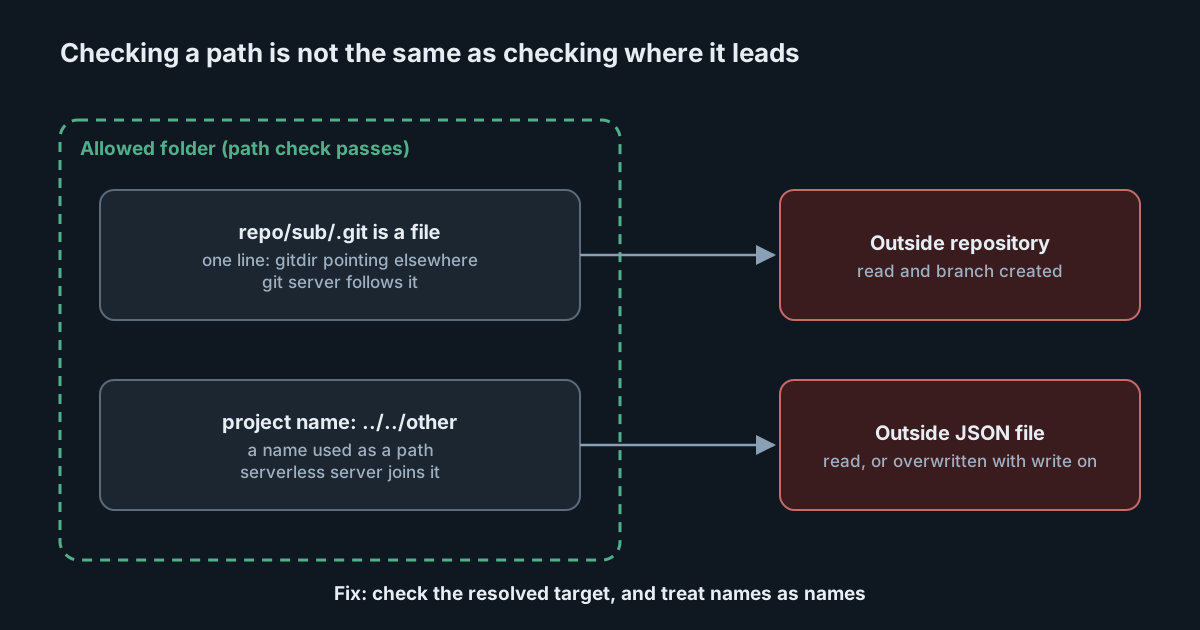
Two MCP servers published advisories within a week of each other for the same kind of mistake. Each is meant to work inside one directory, each checks the paths it is given, and in each case a path that passed the check still led somewhere else. Neither is rated high, and both are fixed. They are worth reading because the same mistake is easy to make in any tool that an agent can call with a path.
mcp-server-git: a redirect the check did not see
On 28 October 2026 the maintainers of the MCP reference servers published GHSA-w766-5x43-whvw for mcp-server-git, rated moderate at 5.3. The git server can be started with --repository to limit it to one repository. It checked that each path a caller gave it was inside that repository, then opened the path with the GitPython library.
The gap is a git feature. A directory can contain a file called .git, rather than a folder, whose one line points to a repository somewhere else. Git's own documentation describes this gitdir: file, which is how worktrees and submodules work. The server's check looked at the path on disk, which was inside the allowed repository. GitPython then followed the redirect. The reporter showed git_show returning content from a repository outside the allowed one and git_create_branch creating a branch in it, while the same calls with the outside path given directly were rejected.
The advisory is careful about the preconditions. An attacker needs to be able to call the git server's tools, to get a .git file placed in a subdirectory of the allowed repository, and to know or guess the path of another repository the server process can read. It suggests one realistic setup: a filesystem MCP server with write access to the same directory, which can create such a file. In an agent session, the caller is the model, so "can call the tools" includes anyone who can put instructions in front of it, such as a crafted issue or a file in the repository.
The affected versions are those before 2026.10.28, and the fix is in mcp-server-git 2026.10.28 on PyPI, uploaded on 28 October. The reporter confirmed the bug in 2026.10.19, the version that our article on the reference servers' 2.1.0 release described as unchanged a few days earlier. If you run the git server with uvx and no version, check what it resolves to. If you pin it, move the pin.
AWS Serverless MCP Server: a project name that was a path
On 2 November 2026 AWS published GHSA-r6mm-377j-qg8m, CVE-2026-116635, rated medium at 6.1, for the awslabs.aws-serverless-mcp-server package. Its deployment status component built a file path from the project name it was given. A project name containing ../ sequences, or an absolute path, let the server read a JSON file outside its status directory. With --enable-write set, it could also create or overwrite JSON files there.
The advisory describes the consequences plainly. A read returns the outside JSON file into the agent's context. A write replaces the file's contents with deployment metadata, so it can damage a file but not choose what is written. It lists no workaround. Versions before 0.2.1 are affected, and 0.2.1 on PyPI was uploaded on 30 October, three days before the advisory.
The trigger, in the advisory's words, is a project name "provided by a third party actor". In practice that means text the agent read, not something the developer typed: a project name in a README, a ticket or a configuration file.
The common mistake
Both bugs check a string and then act on something else. In the git server, the string was a directory path, and what was acted on was wherever its .git file pointed. In the AWS server, the string was meant to be a name, and it was used as a path. Neither check was wrong about the string it saw.
Three patterns avoid this.
- Check the thing you will use, after resolving it. For a repository, that means opening it and then checking where its git directory and working tree really are. The git advisory suggests revalidating the resolved repository and taking worktrees into account.
- Treat names as names. If an input is a project name, reject separators and parent-directory steps, or map names to paths through a lookup rather than by joining strings.
- Keep writes off unless needed. The AWS server's worst case needed
--enable-write. Many MCP servers have a similar switch, and many setups turn it on once and forget it.
What to change in your setups
- Upgrade
mcp-server-gitto 2026.10.28 or later andawslabs.aws-serverless-mcp-serverto 0.2.1 or later, on every machine where developers run them. These usually run locally, so this is a fleet task rather than one server. - Look for setups where a filesystem server with write access shares a directory with the git server. That combination is the one the git advisory describes. Give the filesystem server a narrower root, or make it read-only.
- Remove
--enable-writefrom the AWS Serverless MCP Server where people only need to read deployment status. - Run local MCP servers as a user that cannot read other repositories or configuration it does not need. A path bug can only reach what the process can reach.
Path confinement inside a server is one layer. Limiting which tools an agent can call, and with which arguments, is another, and it still applies when the server's own check fails. In SpanDock, the MCP gateway, on the Premium and Enterprise plans, can run your own MCP servers as programs on the server rather than on each computer. Every connector starts read-only, tools can be allowed or denied by name for each person or group, and block patterns refuse any call whose arguments match a pattern you set.
Sources
- MCP reference servers advisory GHSA-w766-5x43-whvw: mcp-server-git nested gitdir file bypasses --repository confinement
- mcp-server-git on PyPI
- AWS advisory GHSA-r6mm-377j-qg8m (CVE-2026-116635): Improper limitation of a pathname to a restricted directory in the AWS Serverless MCP Server
- awslabs.aws-serverless-mcp-server on PyPI
- Git documentation: gitrepository-layout (the gitdir file)