
GitHub Copilot Evals: regression tests for skills, agents and MCP tools
Copilot Evals, in public preview, runs repeatable tests on your skills, custom agents and MCP tools. What it does, what it costs, and what to watch.
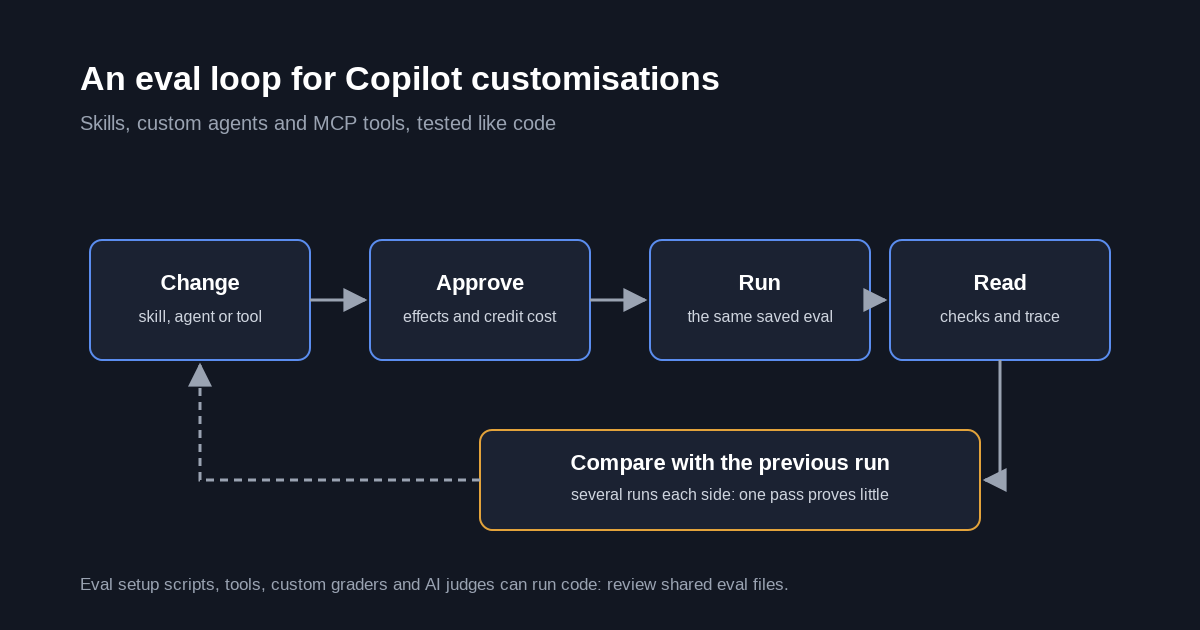
GitHub released Copilot Evals in public preview on 17 November 2026. It lets developers write repeatable tests for the customisations they add to Copilot, namely skills, custom agents and MCP tools, run them, and compare results before and after a change. For teams that share prompt files and agent instructions, it is a way to test them like code. It also brings the usual eval caveats: runs cost money, tests can execute code, and a pass is not a guarantee.
What it is
The changelog post defines an eval as "a repeatable test for AI behavior": give an agent a realistic task, describe a good result, then check the result and how the agent got there. You can ask Copilot in plain language or use the /eval command to:
- create an eval for a skill, custom agent or MCP tool in your project;
- run it and see which checks passed and failed, approving each run before it starts;
- find out why a check failed;
- compare runs from before and after a change.
It is available to Copilot Individual, Business and Enterprise plans, as a VS Code extension, a Copilot CLI plugin and a plugin in the Copilot app.
Underneath, Copilot Evals uses Vally, which GitHub describes as an extensible local eval tool. Vally's own site describes a pipeline in which a stimulus goes in, an executor runs the thing under test, the trajectory records every turn, tool call and token, and graders score the result. It can run locally or in an isolated environment.
What's in the plugin
The project README gives more detail than the announcement. The plugin has six skills (create, review, improve, run, compare and setup), a visual "Evals Canvas", three automation blueprints, and a bundled MCP server called copilot-evals with 15 tools. Evals are saved as files in your project, and results go to .copilot\evals\results.
Running evals needs a local runner. The README lists minimum versions: Node.js 24.0.0 for the CLI plugin or 22.15.0 for VS Code, @microsoft/vally-cli 0.21.0, Copilot CLI 1.0.85 and Git 2.28.0.
One difference between the texts
The changelog presents /eval as available wherever you use Copilot. The README says the /eval commands and the Evals Canvas "currently require Copilot CLI experimental mode" in the CLI, switched on with /settings experimental on. Without it, the six skills still respond to plain-language requests. If /eval doesn't appear, that is the likely reason.
What is genuinely useful
Customisations become testable
A skill or custom agent is code in all but name. It changes what the model does, it is shared across a team, and it is edited by people who can't easily see the effect of a change. Without a tool for it, checking a change often means trying a prompt or two. A saved eval, rerun after each edit, turns that into a regression test.
The design also checks the route, not only the answer. The README's own example asks for release notes that include only completed work, keep issue IDs and "leave the input files unchanged". That last check is about side effects, which is where agent changes tend to go wrong.
Costs are shown before runs
The README separates saving an eval from running it. Validation, and reading or comparing saved results, make no model calls. Each run or grader test asks you to review its "execution effects and token/credit costs" before it starts. Eval spend is easy to lose track of, and an explicit approval step helps.
What to watch
Evals execute code
The README is direct about this: "Eval setup scripts, tools, custom graders and AI judges can execute code and incur charges under your normal local permissions." An eval file from someone else is closer to a script than to a document. Review it before you run it, as you would a test suite from an unfamiliar repository.
Results can hold sensitive data
Saved results include outputs and the conversation trace. The README asks you to review their contents before sharing them. If an agent read a secret during a run, the trace may contain it. Keep .copilot results out of commits unless you have checked them, and consider adding the folder to .gitignore.
One pass proves little
The README says it plainly: "A passing check doesn't guarantee the AI will get it right every time." Model output varies between runs. A single pass after a change is weak evidence; several runs, compared against several runs before the change, are better. We discussed the same problem at benchmark scale in Terminal-Bench 4.0 and honest comparisons of coding agents.
AI judges have their own failure modes
Checks graded by a model inherit that model's blind spots and can be gamed by output that looks right. Where a check can be written as code, such as "the input files are unchanged" or "the output names these IDs", prefer that.
What it means for engineering and security leaders
Customisations are becoming a shared engineering asset, and assets need tests. Copilot Evals gives teams a low-friction way to start, inside tools they already use. The governance questions are familiar: who reviews eval files, who pays for runs, and where results that may contain sensitive data are kept. Answer them while usage is small.
Practical takeaways
- Pick your three most-used skills or agents and write one eval for each, with at least one check on side effects.
- Run each eval several times before and after a change, and compare the spread, not one result.
- Review shared eval files like code, including setup scripts and custom graders.
- Ignore or review
.copilotresults before anything is committed or shared. - Prefer code checks to AI judges where the behaviour can be checked deterministically.
- Track eval spend with your other AI costs; runs show their cost, but only to the person approving them.
If you publish your own skills to every computer with SpanDock's skills feature (in beta; publishing is on the Premium and Enterprise plans), publishing under the same name adds a version, and you can view any version and roll back, so a skill change that fails its evals after release can be undone everywhere.